ASQ Six Sigma Green Belt Study Guide

Preparing for the ASQ Six Sigma Green Belt exam can be overwhelming. This ASQ Six Sigma Green Belt Study Guide lists all key concepts (and links to learn more) for the ASQ Six Sigma Green Belt Certification. This list comes from the 2022 update to the official ASQ Green Belt BOK. And it’s totally free to use.

What is ASQ Six Sigma Green Belt BOK

The ASQ Six Sigma Green Belt BOK is created by the American Society of Quality (ASQ). It’s periodically reviewed and updated by leading members and Six Sigma professionals to ensure it’s relevant to today’s world.

The ASQ Six Sigma Green Belt BOK has six sections geared around Six Sigma Fundamentals and the different phases of DMAIC.

You’ll need to master various topics in order to pass the exam.

How to use the ASQ Six Sigma Green Belt Study Guide

Some ASQ Six Sigma Green Belt candidates will have taken Six Sigma training. Others will be self-taught. No matter your path, you will have to know what’s on the standard BOK – Body of Knowledge.

Step 1: Scan over the material below.

Scan through the rest of this page before proceeding further. Take a look at what will be asked. Do you feel comfortable with this material? Is anything new to you? Are there any surprises?

Make a mental note of that and proceed.

Step 2: Review (or learn!) the material.

Not every training program covers every topic. Depending on the quality of the training you took, your instructor may have skipped a section entirely! Click one of the links to dive into any topic that you don’t feel as strongly as you’d like and read up.

Step 3: Leave a comment on any page where you have questions.

Each topic below is linked to a detailed article where I thoroughly review the concept. If you have any questions, or if any topic is less clear than you’d like it to be, leave a comment, and I’ll get back to you ASAP.

Step 4: Practice as many questions as possible.

Find an excellent question bank covering each section, and take as many practice tests as possible.

The ASQ Six Sigma Green Belt BOK

What follows below is the ASQ Six Sigma Green Belt BOK. The top-level sections I through VI also list the number of questions you can expect in that section. This will help you see the relative weight of those topics compared to others.

I Overview: Six Sigma and the Organization (11 Questions)

I.A Six Sigma and organizational goals

I.A.1 Value of Six Sigma

Recognize why organizations use Six Sigma, how they apply their philosophy and goals, and the evolution of Six Sigma from quality leaders such as (Juran, Deming, Shewhart, Ishikawa, and others.).

I.A.2 Organizational goals and Six Sigma projects

Identify the linkages and supports that need to be established between a selected Six Sigma project and the organization’s goals, including SMART goals, and describe how process inputs, outputs, and feedback at all levels can influence the organization as a whole. (Understand)

I.A.3 Organizational drivers and metrics

Recognize key drivers for business (profit, market share, customer satisfaction, efficiency, product differentiation, key performance indicators (KPIs)) for all types of organizations. Understand how key metrics and scorecards are developed and how they impact the entire organization. (Understand)

I.B Lean principles in the organization

I.B.1 Lean Concepts

Define and describe lean concepts such as the theory of constraints, value chain, flow, takt time,
just-in-time (JIT), Gemba, spaghetti diagrams, and perfection. (Apply)

I.B.2 Value-stream mapping

Use value-stream mapping to identify value-added processes and steps or processes that
produce waste, including excess inventory, unused space, test inspection, rework,
transportation, and storage. (Understand)

I.C Design for Six Sigma (DFSS) methodologies

I.C.1 Road maps for DFSS

Describe and distinguish between DMADV (define, measure, analyze, design, verify) and IDOV (identify, design, optimize, verify), and identify how they relate to DMAIC. Describe how these methodologies are used for improving the end product or process during the design (DFSS) phase. Understand how verification and validation are used to compare results against stated goals.

I.C.2 Basic failure mode and effects analysis (FMEA)

Use FMEA to evaluate a process or product and determine what might cause it to fail and the effects that failure could have. Identify and use scale criteria, calculate the risk priority number (RPN), and analyze the results. (Analyze)

I.C.3 Design FMEA and process FMEA

Define and distinguish between these two uses of FMEA. (Apply)

II Define Phase (20 Questions)

II.A Project identification

II.A.1 Project selection

Describe the project selection process and what factors should be considered in deciding whether to use the Six Sigma DMAIC methodology or another problem-solving process. (Understand)

II.A.2 Process elements

Define and describe process components and boundaries. Recognize how processes cross various functional areas and the challenges that result from process improvement efforts. (Analyze)

II.A.3 Benchmarking

Understand various types of benchmarking, including competitive, collaborative, and best practices. (Understand)

II.A.4 Process inputs and outputs

Identify process input variables and process output variables and document their relationships using the supplier, inputs, process, output, and customer (SIPOC) model. (Apply)

II.A.5 Owners and stakeholders

Identify process owners and other stakeholders in a project. (Apply)

II.B Voice of the Customer (VOC)

II.B.1 Customer Identification

Identify the internal and external customers of a project, and what effect the project will have on them. (Apply)

II.B.2 Customer data

Collect feedback from customers using surveys, focus groups, interviews, and various forms of observation. Identify the key elements that make these tools effective. Review data collection questions to eliminate vagueness, ambiguity, and any unintended bias. (Apply)

II.B.3 Customer requirements

Use quality function deployment (QFD), Critical to X (CTX when ‘X’ can be quality, cost, safety, etc.), Critical to Quality tree (CTQ), and Kano model to translate customer requirements statements into product features, performance measures, or opportunities for improvement. Use weighting methods as needed to amplify the importance and urgency of different kinds of input: telephone call vs. survey response, product complaint vs. expedited service request. (Apply)

II.C Project management basics

II.C.1 Project Methodology

Define and apply agile and top-down management methods. (Apply)

II.C.2 Project charter

Define and describe elements of a project charter and develop a problem statement, including baseline or current status to be improved and the project’s goals. (Apply)

II.C.3 Project scope

Help define the scope of the project using process maps, Pareto charts, and other quality tools. (Apply)

II.C.4 Project metrics

Help develop primary metrics (reduce defect levels by x amount) and consequential metrics (the negative effects that making the planned improvement might cause). (Apply)

II.C.5 Project planning tools

Use work breakdown structures (WBS), Gantt charts, critical path method (CPM), program evaluation and review technique (PERT) charts, and toll-gate reviews to plan projects and monitor their progress.

II.C.6 Project documentation

Describe the types of data and input needed to document a project. Identify and help develop appropriate presentation tools (storyboards, spreadsheet summary of results) for phase reviews and management updates. (Apply)

II.C.7 Project risk analysis and management

Describe the elements of project risk analysis, including feasibility, potential impact, risk priority number (RPN), and risk management. Identify the potential effect risk can have on project goals and schedule, resources (materials and personnel), business continuity planning, costs and other financial measures, and stakeholders.

II.C.8 Project closure

Review the project objectives achieved in relation to the project charter with team members and sponsors and ensure that documentation is completed and stored appropriately. Identify lessons learned and inform other parts of the organization about opportunities for improvement. (Apply)

II.D Management and planning tools

Define, select, and use 1) affinity diagrams, 2) interrelationship digraphs, 3) tree diagrams, 4) prioritization matrices, 5) matrix diagrams, 6) process decision program (PDPC) charts, 7) activity network diagrams, and SWOT analysis. (Apply)

II.E Business results for projects

II.E.1 Process performance

Calculate process performance metrics such as defects per unit (DPU), rolled throughput yield (RTY), cost of poor quality (COPQ), defects per million opportunities (DPMO), sigma levels, and process capability indices. Track process performance measures to drive project decisions. (Analyze)

II.E.2 Communication

Define and describe communication techniques used in organizations: top-down, bottom-up, and horizontal. (Apply)

II.F Team dynamics and performance

II.F.1 Team stages and dynamics

Define and describe the stages of team evolution, including forming, storming, norming, performing, adjourning, and recognition. Identify and help resolve negative dynamics such as overbearing, dominant, or reluctant participants, the unquestioned acceptance of opinions as facts, groupthink, feuding, floundering, the rush to accomplishment, attribution, discounts, plops, digressions, and tangents. (Understand)

II.F.2 Team roles and responsibilities

Use tools such as RACI to describe and define the roles and responsibilities of participants on Six Sigma and other teams, including black belt, master black belt, green belt, champion, executive, coach, facilitator, team member, sponsor, process owner, etc. (Apply)

II.F.3 Team tools

Define and apply team tools such as brainstorming and decision-making concepts such as nominal group technique and multi-voting. (Apply)

II.F.4 Team Communication

Identify and use appropriate communication methods (both within the team and from the team to various stakeholders) to report progress, conduct reviews, and support the overall success of the project. (Apply)

III Measure Phase (20 Questions)

III.A Process analysis and documentation

Develop process maps and review written procedures, work instructions, and flowcharts to identify any gaps or areas of the process that are misaligned. (Create)

III.B Probability and statistics

Rusty on the math behind these topics? Join the Math Confidence for Six Sigma waitlist and I’ll let you know when the course opens.

III.B.1 Basic probability concepts

Describe and interpret basic probability concepts: independent events, mutually exclusive events, multiplication rules, permutations, and combinations. (Understand)

III.B.2 Central limit theorem

Define the central limit theorem and describe its significance in relation to confidence intervals, hypothesis testing, control charts, etc. (Apply)

III.C Statistical distributions

Define and describe various distributions as they apply to statistical process control and probability: normal, binomial, Poisson, chi-square, Student’s t, and F distributions. (Apply)

III.D Collecting and summarizing data

III.D.1 Types of data and measurement scales

Identify and classify continuous (variables) and discrete (attributes) data. Describe and define
nominal, ordinal, interval, and ratio measurement scales.
(Analyze)

III.D.2 Sampling and data collection plans and methods

Define and apply various sampling methods (random and stratified) and data collection methods (check sheets and data coding). Prepare data collection plans that include gathering data and performing quality checks (e.g., minimum/maximum values, erroneous data, null values). (Apply)

III.D.3 Descriptive statistics

Define, calculate, and interpret measures of dispersion and central tendency. Develop and interpret frequency distributions and cumulative frequency distributions. (Evaluate) Also, see Kinds of Statistics.

III.D.4 Graphical methods

Depict relationships by constructing, applying, and interpreting diagrams and charts such as stem-and-leaf plots, box-and-whisker plots, run charts, scatter diagrams, Pareto charts, etc. Depict distributions by constructing, applying, and interpreting diagrams such as histograms, normal probability plots, etc. (Create)

III.E Measurement system analysis (MSA)

Calculate, analyze, and interpret measurement system capability using gauge repeatability and reproducibility (GR&R) studies, measurement correlation, bias, linearity, percent agreement, and precision/tolerance (P/T). (Evaluate)

III.F Process and Performance Capability

III.F.1 Process performance vs. specification

Define and distinguish between natural process limits and specification limits, and calculate process performance metrics. (Evaluate)

III.F.2 Process Capability Studies (aka Capability Analysis)

Define, describe, and conduct process capability studies, including identifying characteristics, specifications, and tolerances and verifying stability and normality. (Evaluate)

III.F.3 Process capability (Cp, Cpk) and process performance (Pp, Ppk) indices

Describe the relationship between these types of indices. Define, select, and calculate process capability and process performance. Describe when Cpm measures can be used. Calculate the sigma level of a process. (Evaluate)

III.F.4 Short-term vs. long-term capability

Describe the assumptions and conventions that are appropriate when only short-term data are collected and when only attribute data are available. Describe the changes in relationships that occur when long-term data are used, and interpret the relationship between long- and short-term capability as it relates to a 1.5 sigma shift. (Evaluate)

IV Analyze Phase (18 Questions)

IV.A Exploratory data analysis

IV.A.1 Multi-vari studies

Select appropriate sampling plans to create multi-vari study charts and interpret the results for
positional, cyclical, and temporal variation. (Create)

IV.A.2 Correlation and linear regression

Describe the difference between correlation and causation. Calculate the correlation
coefficient
and linear regression and interpret the results in terms of statistical significance (p-value). Use regression models for estimation and prediction. (Evaluate)

IV.B Hypothesis testing

IV.B.1 Basics

Define and distinguish between statistical and practical significance and apply tests for significance level, power, type I, and type II errors. Determine the appropriate sample size for various tests. (Apply).

IV.B.2 Tests for means, variances, and proportions

Conduct hypothesis tests to compare means, variances, and proportions (paired-comparison t-test, F-test, analysis of variance (ANOVA), Chi-square) and interpret the results. (Analyze)

IV.C Additional Analysis Methods

IV.C.1 Gap analysis

Analyze scenarios to identify performance gaps and compare current and future states using predefined metrics.

IV.C.2 Root cause analysis

Use cause and effect diagrams, relational matrices, 5 Whys, fault tree analysis, and other problem-solving tools to identify the true cause of a problem. (Analyze)

V Improve Phase (16 Questions)

V.A Design of experiments (DOE)

V.A.1 Basic terms

Define and describe terms such as independent and dependent variables, factors and levels, response, treatment, error, repetition, and replication. (Understand)

V.A.2 DOE graphs and plots

Interpret main effects analysis and interaction plots. (Apply)

V.B Implementation planning

Apply implementation planning by using proof of concept, try-storming, simulations, and conducting pilot tests. (Apply)

V.C Lean tools

V.C.1 Waste elimination

Select and apply tools and techniques for eliminating or preventing waste, including pull systems, kanban, 5S, standard work, and poka-yoke. (Apply)

V.C.2 Cycle-time reduction

Use various techniques to reduce cycle time (continuous flow, setup reduction), single-minute
exchange of dies (SMED)
. (Analyze)

V.C.3 Kaizen and kaizen blitz

Define and distinguish between these two methods and apply them in various situations. (Apply)

VI Control Phase (15 questions)

VI.A Statistical process control (SPC)

VI.A.1 SPC Basics

Describe the theory and objectives of SPC, including measuring and monitoring process
performance for both continuous and discrete data. Define and distinguish between common
and special cause variation and how these conditions can be deduced from control chart
analysis.
(Analyze)

VI.A.2 Rational subgrouping

Define and describe how rational subgrouping is used. (Understand)

VI.A.3 Control Charts

Identify, select, construct, and use control charts: X Bar−R, X Bar−s, individuals and moving range (ImR / XmR), median, p, np, c, and u. (Apply)

VI.B Sustain improvements

VI.B.1 Control plan

Assist in developing and implementing a control plan to document and monitor the process. (Apply)

VI.B.2 Document control

Understand document control and its role in controlling and sustaining improvements. (Understand)

VI.B.3 Training plans

Develop training plans to implement and sustain improvements. (Apply)

VI.B.4 Audits

Define first-, second-, and third-party audits. (Remember)

VI.B.5 Plan-do-check-act (PDCA)

Apply and distinguish between the steps of plan-do-check-act (PDCA). (Apply)

Six Levels of Cognition based on Bloom’s Taxonomy (Revised)

In addition to content specifics, the subtext detail also indicates the intended complexity level of the test questions for that topic. These levels are based on the Revised “Levels of Cognition” (from Bloom’s Taxonomy, 2001) and are presented below in rank order, from least complex to most complex.

Remember
Be able to remember or recognize terminology, definitions, facts, ideas, materials, patterns, sequences, methodologies, principles, etc. (Also commonly referred to as recognition, recall, or rote knowledge)

Understand
Be able to read and understand descriptions, communications, reports, tables, diagrams, directions, regulations, etc.

Apply
Be able to apply ideas, procedures, methods, formulas, principles, theories, etc., in job-related situations.

Analyze
Be able to break down information into its constituent parts and recognize the parts’ relationship to one another and how they are organized; identify sublevel factors or salient data from a complex scenario.

Evaluate
Be able to make judgments regarding the value of proposed ideas, solutions, methodologies, etc., by using appropriate criteria or standards to estimate accuracy, effectiveness, economic benefits, etc.

Create
Be able to put parts or elements together in such a way as to show a pattern or structure not clearly there before; able to identify which data or information from a complex set is appropriate to examine further or from which supported conclusions can be drawn.

ASQ Six Sigma Green Belt Study Guide Helpful Links:

https://asq.org/cert/resource/pdf/certification/2022-SSGB-BoK-Map.pdf

When you’re ready, there are a few ways I can help:

First, join 12,000+ other Six Sigma professionals by subscribing to my email newsletter. A short read every Monday to start your work week off correctly. Always free.

* * *

If you’re looking to pass your Six Sigma Yellow Belt, Green Belt or Black Belt exam, I’d recommend starting with my affordable study guide:

1)→ 🟡Pass Your Six Sigma Yellow Belt: built for ASQ, IASSC and ILSSI, 1,700+ practice questions with explanations, and six full-length mock exams for your exam

2)→ 🟢Pass Your Six Sigma Green Belt: a study guide organized by the exam Body of Knowledge, 1,300+ practice questions with detailed answer explanations, and 20 full-length mock exams

3)→ ⚫Pass Your Six Sigma Black Belt: the full Black Belt Body of Knowledge, 2,200+ practice questions with detailed answer explanations, and 20 full-length mock exams

You’ve spent so much effort learning Lean Six Sigma. Why leave passing your certification exam up to chance? This comprehensive study guide offers 1,700+ exam-like questions for Yellow Belts, 1,300+ for Green Belts and 2,200+ for Black Belts with full answer walkthroughs, access to instructors, detailed study material, and more.

​ Thousands have used this system to prepare. Join them here. 

Frequency Plots

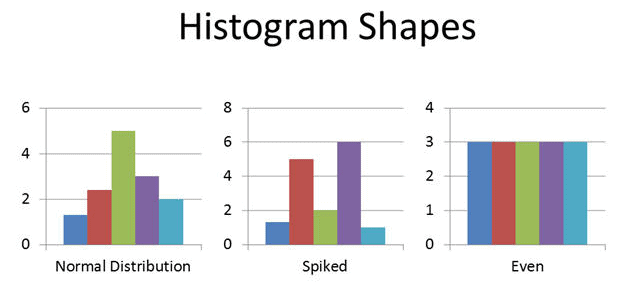
Frequency plots are helpful for monitoring the spread of continuous data. A frequency plot is a graph showing a variable’s distributional information. In other words, it summarizes the data by plotting how frequently a particular value occurs.

Frequency plots allow you to summarize lots of data in a graphical manner making it easy to see the distribution of that data and process capability, especially when compared to specifications. For example, is our data normally distributed or not?

Frequency Plots can tell us a lot about a data set or a process. For instance, the quantity of occurrences of the response variable is computed for each interval. Now that we have this information, we can create a graph that consists of frequencies on the vertical axis and response variables on the horizontal axis.

frequency plot
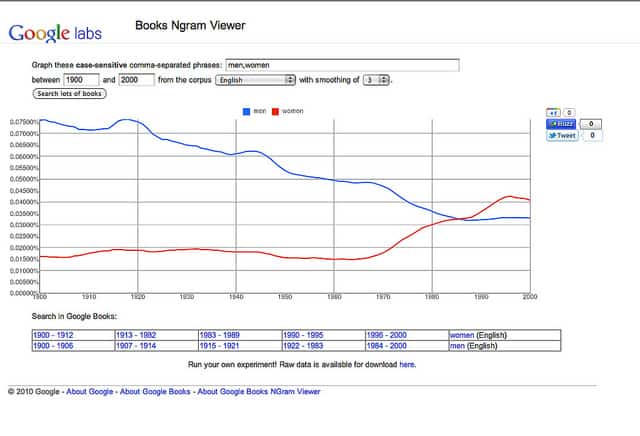
Google Ngram Viewer provides an interesting frequency plot. Photo by woodlywonderworks

Why Frequency Plots

Frequency plots reveal the spread, kinds of variation, and center of the data without making us do calculations. They also help detect overlapping processes and sometimes measurement errors.

You generally need 50 data points of continuous data. A frequency plot ignores time order, so it can hide shifts and trends. Check stability on a run chart first.

Types of Frequency Plots

Histogram

A Histogram is the graphical representation of a frequency distribution. It is in the form of a rectangle with class intervals as bases and the corresponding frequencies as heights. Particularly, there is no gap between any two successive rectangles.

In a Histogram, each bar or column represents the frequency of occurrence of continuous quantitative variables.

Frequency Plots

The basic advantage of Histograms is to display a large amount of data graphically that are difficult to interpret in a tabular form. In addition, it shows the process’s central tendency.

How to Make a Histogram?

  • Firstly, collect the data
  • Secondly, arrange the data points in order and assign categories
  • Thirdly, find the lowest and highest value
  • Fourthly, find the number of intervals
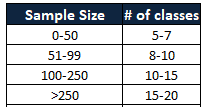
  • You could use the 2^k rule: pick the smallest whole number k where 2^k is at least N. Here k = number of classes and N = number of data points.

The number of categories to use in the histogram depends on the sample size.

  • Now, compute the intervals by covering the entire range of the data set
  • Then, find the frequency of occurrence of each data point as per the interval
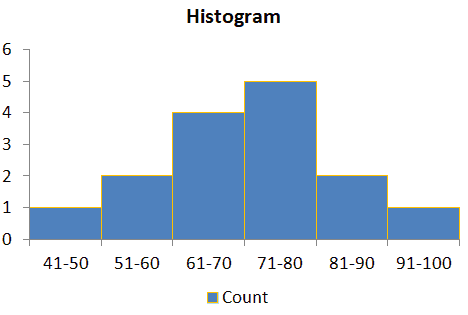
  • Finally, draw the bar chart preserving counts and categories

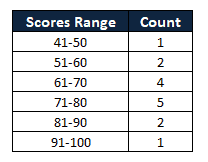
Example: Following are the 15 student’s marks in a science subject. Compute the Histogram

94,72,78,73,82,42,62,56,85,64,75,66,68,76,58

  • Arrange the data in order

42,56,58,62,64,66,68,72,73,75,76,78,82,85,94

  • Find the intervals

  • Finally, draw the bar chart preserving counts and categories

Frequency Plots

Histogram Excel Template


Unlock Additional Members-only Content!

To unlock additional content, please upgrade now to a full membership.

Upgrade to a Full Membership

If you are a member, you can log in here.

Dot Plot

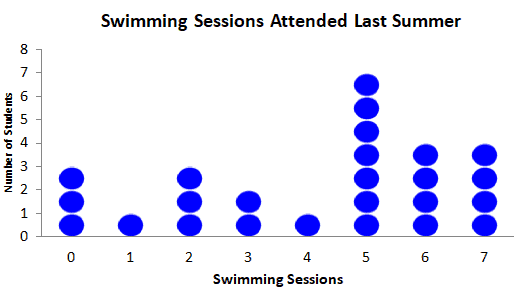
A dot plot, also known as a dot chart, is the most basic frequency plot. It shows the number of times a value occurred in a data set, where every data value is represented by a dot in the graph.

In other words, the number of times a value is repeated corresponds to the number of dots above that particular value or item.

How to Make a Dot Plot?

  • Firstly, collect the data
  • Secondly, organize the data by arranging the numbers in ascending order
  • Then, draw a horizontal number line that corresponds to the range of the data values that covers all the data points
  • Finally, place a dot above the number line to represent each data against the particular value

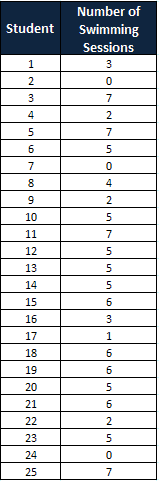
Example: Below is data showing the number of swimming sessions 25 high school students attended last summer. Draw a dot plot and also find the most common number of sessions.

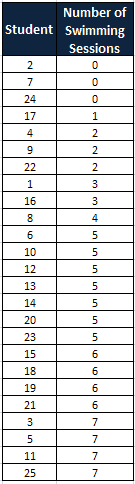
Organize data in ascending order.

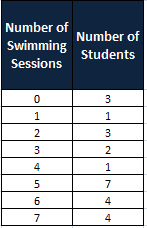
Summarize the data values.

Finally, place a dot above the number line to represent each data against the particular value.

Frequency Plots

From the above graph, it is clear that the most common count is 5 sessions. Seven of the 25 students attended 5 sessions.

Dot Plot Template

Download a dot plot template here.


Unlock Additional Members-only Content!

To unlock additional content, please upgrade now to a full membership.

Upgrade to a Full Membership

If you are a member, you can log in here.

Box Plot

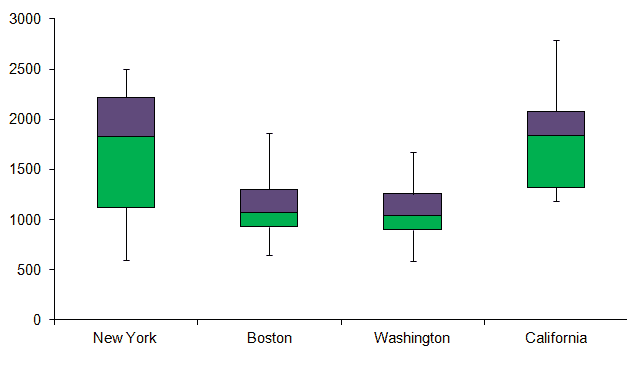
Box Plot also known as Box-and-Whisker plot, is a pictorial representation of continuous data. It shows the Max, Min, median, and interquartile range Q1 and Q3 as well as outliers.

Box plots are tools that generally let you easily compare variations between the data sets evaluated. It also makes comparing data quick and easy.

How to Make a Box and Whisker Plot?

  • Firstly, gather the data: Get the data for which you need to create plots.
  • Secondly, organize this data: Order the data by sorting them in order (in ascending or increasing order).
  • Thirdly, calculate Medians: Find out the Median of this data range. This Median will divide the data into halves. If the data set has an odd set of numbers, the Median would have an equal amount of numbers on both sides. And, if the data set has an even set of numbers, then average the 2 numbers in the middle.
  • Then, calculate the 1st and 3rd quartiles: This can be found by finding out the Median of each of the halves.
  • Finally, draw plotlines: Now, you must draw plotlines and mark the Median and quartiles.

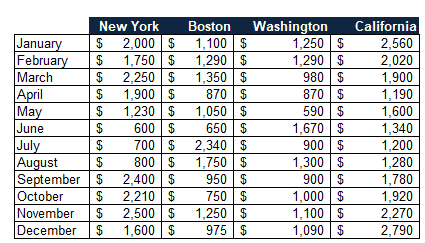
Example: Draw a box plot for the below 4 regions’ sales values.

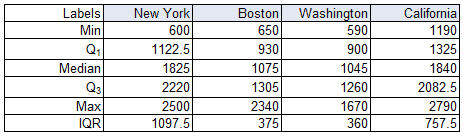
Then sort the data in ascending order. Then find the maximum, minimum, and median values. In addition, compute the 1st and 3rd quartiles.

The quartiles above come from Excel’s QUARTILE.INC function. Splitting the sorted data at the median and taking the median of each half gives slightly different values (for New York, Q1 = 1015 and Q3 = 2230). Both conventions are in use; say which one you used.

Finally, you need to draw plot lines and mark the Median and quartiles.

Frequency Plots

Download a Box Plot Template Here:


Unlock Additional Members-only Content!

To unlock additional content, please upgrade now to a full membership.

Upgrade to a Full Membership

If you are a member, you can log in here.

Benefits of Frequency Plots

  • Easy to review lots of data in a graphical manner.
  • It provides the shape, center, and range of the data.
  • Frequency plots also help to identify where the data is located relative to the process specifications or targets.
  • It helps to predict the future performance of the process.

Frequency Plot Videos

When you’re ready, there are a few ways I can help:

First, join 12,000+ other Six Sigma professionals by subscribing to my email newsletter. A short read every Monday to start your work week off correctly. Always free.

* * *

If you’re looking to pass your Six Sigma Yellow Belt, Green Belt or Black Belt exam, I’d recommend starting with my affordable study guide:

1)→ 🟡Pass Your Six Sigma Yellow Belt: built for ASQ, IASSC and ILSSI, 1,700+ practice questions with explanations, and six full-length mock exams for your exam

2)→ 🟢Pass Your Six Sigma Green Belt: a study guide organized by the exam Body of Knowledge, 1,300+ practice questions with detailed answer explanations, and 20 full-length mock exams

3)→ ⚫Pass Your Six Sigma Black Belt: the full Black Belt Body of Knowledge, 2,200+ practice questions with detailed answer explanations, and 20 full-length mock exams

You’ve spent so much effort learning Lean Six Sigma. Why leave passing your certification exam up to chance? This comprehensive study guide offers 1,700+ exam-like questions for Yellow Belts, 1,300+ for Green Belts and 2,200+ for Black Belts with full answer walkthroughs, access to instructors, detailed study material, and more.

​ Thousands have used this system to prepare. Join them here. 
Process Performance Pp and Ppk

Process Performance Pp and Ppk tell you how your process actually did against the customer’s limits. They use all of your data, drift and shifts included. Pp looks at spread. Ppk looks at spread and centering together. If you only remember one thing, remember this: Pp and Ppk report what the customer got. Cp and Cpk report what the process could do if it stayed stable.

What Are Process Performance Pp and Ppk?

How do you know if your process can meet its specs? Process performance Pp measures the process spread vs. the specification spread. In other words, how spread out your process output is vs. what the requirements allow. Ppk adds one more question: is the process aimed at the middle?

If you’d like more depth, see these articles:

Note: Use Pp & Ppk when you are initially setting up your process. They use all the data, so they still mean something before you have proven stability. After a process has reached statistical control, use Cp & Cpk. Keep reporting Pp and Ppk too. The gap between the two pairs tells you a lot (more on that below).

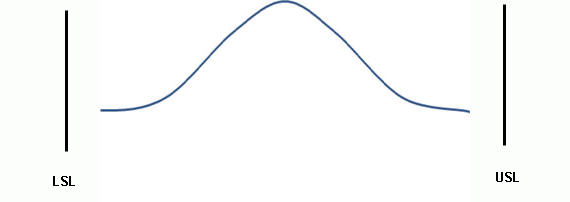
Let’s imagine that your process has 2 specifications: a Lower Specification Limit (LSL), which is the lowest value allowed, and an Upper Specification Limit (USL), the highest value allowed. We call the difference between the two the specification spread, sometimes referred to as the Voice of the Client. The customer sets it. Your process does not move it.

The process spread is how wide your output actually runs. For Pp and Ppk we define it as 6 standard deviations (plus or minus 3s around the mean). That covers about 99.73% of a normal process. We sometimes refer to this as the Voice of the Process.

Process Spread vs. Specification Spread

Think of the Specification Spread as the sides of your garage. They are static. They are not moving, and it is important that your process puts values inside those bounds. The Process Spread is the size of the car you are trying to fit in.

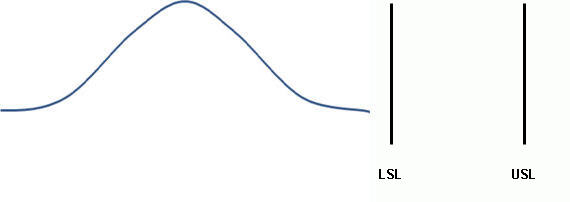
Specification Spread vs Process Spread: Process Performance (Pp, Ppk)
Specification Spread vs Process Spread

Can A Process Meet Specifications?

The answer is in the amount of variation in your process. If your process spread exceeds the specification spread, then the answer is no. However, if the process spread is less than the specification spread, then process variation is low enough for it to fit.

Process Meets Specifications: Good Potential Performance

The bell curve is narrower than the spec window. Six standard deviations fit inside LSL to USL, so Pp is greater than 1. A compact car in a two-car garage. Room on both sides.

good potential performance

Process Does NOT Meet Specifications: Bad Potential Performance

The bell curve is wider than the spec window, so Pp is less than 1. Perfect centering will not save you. Some output will land outside the limits no matter where you aim. That is an RV and a one-car garage.

Bad Potential Performance: Process Performance (Pp, Ppk)
Bad Potential Performance
This is what happens when your process spread does not match your specification spread!

Calculating Process Performance (Pp)

Pp = (USL – LSL) / (6s)

Here s is the overall sample standard deviation of all your data, or the ‘fatness’ of the bell curve. Do not use subgroup ranges here. Pp wants every data point, pooled together, so any drift between shifts, lots, or operators shows up in s.

Notice what Pp ignores: the mean. Slide the whole curve left or right and Pp does not change. That is why you never read Pp alone.

What is a ‘Good’ Process Performance (Pp) Number?

Six Sigma quality means 6 sigmas (standard deviations) between the mean and each spec limit. That’s 12 sigmas between the LSL and the USL.

Plug that into the formula. Replace (USL – LSL) with 12s:

Pp = 12s / 6s = 2.0

So a centered Six Sigma process has a Pp of 2.0. Where does the famous 3.4 DPMO come from, then? Six Sigma assumes the mean drifts about 1.5 sigma over the long run. That leaves 4.5 sigma to the nearest limit, which is a Ppk of 1.5. A 4.5 sigma tail is 3.4 defects per million. So you will see both numbers: 2.0 for Pp and 1.5 for long-term Ppk. They describe the same process.

In practice, most customers set the bar lower. 1.33 is a common minimum. Many automotive customers want 1.67 or higher on a new process.

Is the Process Acceptable? Ppk (Performance)

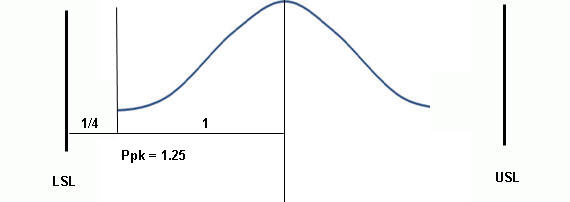
Ppk measures how close the process mean sits to the nearest specification limit. In other words, does this process deliver acceptable results where it is actually aimed?

A narrow process that is parked against one limit still makes defects. Ppk catches that. Pp does not.

That Process was poorly centered! Unacceptable! An unsuccessful Process Performance (Pp, Ppk).
That process was poorly centered! Unacceptable!

Calculating Ppk

Ppk = min[ (USL – x̄) / 3s , (x̄ – LSL) / 3s ]

Calculate both sides. Report the smaller one. The worse side is the side that makes your defects.

Actual performance Ppk: Process Performance (Pp, Ppk)
Actual performance Ppk

Process Mean close to USL

If your Process Mean (central tendency) is closer to the USL, the upper side wins: Ppk = (USL – x̄) / 3s, where x̄ is the Process Mean.

Process Mean close to LSL

If your Process Mean (central tendency) is closer to the LSL, the lower side wins: Ppk = (x̄ – LSL) / 3s, where x̄ is the Process Mean.

One-sided spec? Only a USL (like impurity) or only an LSL (like pull strength)? Then there is no Pp. Ppk is just the one side you have.

Interpreting Ppk Scores

A Ppk of 1 means there is exactly “half of a bell curve” (3 standard deviations) between the process mean and the nearest specification limit. It does not tell you the process is centered. For that, compare Ppk to Pp:

  • Ppk = Pp: the process is centered.
  • Ppk less than Pp: the process is off center. The bigger the gap, the further off.
  • Ppk greater than Pp: impossible. Check your math.
  • Ppk below zero: the mean is outside the spec limits. Most of your output is scrap.

Here is how Ppk lines up with sigma distance and defect rate. The defect rates assume normal data and count only the nearest tail. If the process is centered, double them to get both tails.

Ppk Sigmas to nearest limit (Z) Defects per million, nearest tail What it means
0.33 1.0 158,655 Badly off target or too wide. Fix it now.
1.00 3.0 1,350 Barely fits. Any shift makes defects.
1.33 4.0 32 Common minimum for acceptance.
1.50 4.5 3.4 Six Sigma long-term (after a 1.5 sigma shift).
1.67 5.0 0.29 Strong. Typical target for a new process.
2.00 6.0 0.001 Six Sigma short-term, centered.

Pp vs. Cp: Long-Term vs. Short-Term Sigma

Pp and Cp use the same formula. Ppk and Cpk use the same formula. The only difference is which standard deviation you plug in.

  • Pp, Ppk: overall (long-term) s. The standard deviation of every data point, pooled together.
  • Cp, Cpk: within-subgroup (short-term) sigma. Usually estimated from a control chart as R-bar / d2 or s-bar / c4. It only sees the variation inside each subgroup.

Overall s includes everything the within-subgroup sigma misses: shift changes, tool wear, new material lots, Monday mornings. So overall s is almost always the larger of the two. That means Ppk is almost always less than or equal to Cpk.

Read the gap. If Cpk is 1.4 and Ppk is 1.3, the process is behaving. If Cpk is 1.4 and Ppk is 0.7, something is moving the mean between subgroups. The process is not stable, and the Cpk is a promise you are not keeping. Go look at the control chart before you report either number.

Worked Example: Process Performance Pp and Ppk on a Bolt Line

A plant makes bolts with a target length of 50.00 mm. The spec is 49.80 to 50.20 mm. In the Measure phase, the team pulls 1,500 parts across several weeks.

Baseline: mean = 50.10 mm, overall s = 0.10 mm.

  • Pp = (50.20 – 49.80) / (6 x 0.10) = 0.40 / 0.60 = 0.67
  • Upper side = (50.20 – 50.10) / (3 x 0.10) = 0.10 / 0.30 = 0.33
  • Lower side = (50.10 – 49.80) / (3 x 0.10) = 0.30 / 0.30 = 1.00
  • Ppk = the smaller side = 0.33

Pp of 0.67 says the process runs 0.60 mm wide in a 0.40 mm window. Too wide. Ppk of 0.33 says it is also aimed high. The upper limit is only 1 sigma from the mean, so roughly 16% of the bolts come out long. Another 0.1% come out short. That is a sorting operation, not a process.

The team also runs an X-bar and R chart. Within-subgroup sigma comes out at 0.06 mm. That gives Cp = 0.40 / 0.36 = 1.11 and Cpk = 0.10 / 0.18 = 0.56. The gap between Cp (1.11) and Pp (0.67) points at something moving between subgroups. The team finds tool wear between tool changes.

After improvement: a tool change schedule and a new offset procedure. Mean = 50.00 mm, overall s = 0.05 mm.

  • Pp = 0.40 / (6 x 0.05) = 0.40 / 0.30 = 1.33
  • Ppk = 0.20 / (3 x 0.05) = 0.20 / 0.15 = 1.33

Pp doubled. Ppk went up four times. Pp now equals Ppk, so the process is centered. Each limit is 4 sigma away, which is about 63 defects per million across both tails. In Control, the team keeps tracking Ppk monthly to prove the gain holds.

Pp, Ppk In Relation to Z Scores

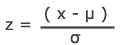
Ppk can be determined by dividing the Z score to the nearest spec limit by three. A z score is the same as a standard score: the number of standard deviations a value sits from the mean.

z_pop

Z = (x – mean of the population) / standard deviation.

Ppk = (USL – µ) / 3σ = ZUSL / 3, when the USL is the nearer limit.

Flip it and Z = 3 x Ppk. A Ppk of 1.33 puts the nearest limit 4 sigma out. Look up Z = 4 in a Z table and you get about 32 defects per million in that tail. A Ppk of 1.0 is Z = 3, or about 1,350 per million in that tail.

Common Mistakes with Pp and Ppk

  • Reading Pp without Ppk. Pp ignores the mean. A great Pp on a process parked against a limit still ships defects.
  • Using the wrong sigma. Pp and Ppk use the overall s of all the data. If you plug in R-bar / d2, you calculated Cp and Cpk.
  • Too little data. Thirty parts from one morning is not long-term. Collect across the sources of variation you expect: shifts, lots, operators, tool changes.
  • Ignoring the shape. The Z table only works for roughly normal data. Check a histogram or normal probability plot first. Skewed data needs a transformation or a non-normal method.
  • Treating an unstable Ppk as a forecast. Ppk tells you what happened. If the process is out of control, it does not tell you what happens next month.
  • Comparing across products without the spec. A loose tolerance can give a high Ppk to a sloppy process. Compare indices only when you know the specs behind them.

Exam Tips for Process Performance Pp and Ppk

  • Pp = (USL – LSL) / 6s. Ppk = the smaller of (USL – x̄) / 3s and (x̄ – LSL) / 3s.
  • “Overall,” “long-term,” or “total” standard deviation points to Pp and Ppk. “Within,” “short-term,” or “R-bar / d2” points to Cp and Cpk.
  • Ppk is never larger than Pp. They are equal only when the process is centered.
  • Z to the nearest limit = 3 x Ppk.
  • Specification limits come from the customer. Improving the process changes the indices, never the specs.
  • Watch for a mean outside the limits. The answer may be a negative Ppk.

ASQ Six Sigma Green Belt Process Performance Questions

Question: Which of the following measures is increased when process performance is improved?

(A) Variability range
(B) Capability index
(C) Repeatability index
(D) Specification limits

Answer:


Unlock Additional Members-only Content!

To unlock additional content, please upgrade now to a full membership.

Upgrade to a Full Membership

If you are a member, you can log in here.

Free Six Sigma Green Belt and Black Belt Practice Exams

You want a free Six Sigma Green Belt practice test (or the Black Belt version) so you can see where you stand before you spend months studying. That’s a good instinct. So here’s what I offer for free, what’s in it, and how to use it well.

Create a free account to take the practice exams. Pick the belt you’re studying for:

No credit card needed. Signing up also adds you to my email list, and you can unsubscribe at any time.

What’s in the free Six Sigma Green Belt practice test and Black Belt exams

Free Green Belt account Free Black Belt account
ASQ-style practice exam 11 questions, 45-minute timer 75 questions, 90-minute timer
IASSC-style practice exam 14 questions across Define, Measure, Analyze, Improve and Control 15 questions across Define, Measure, Analyze, Improve and Control
Topic quizzes None 9 short ASQ topic quizzes (Define through Control, DFSS, team management and more)
How-to-study lessons 5 short lessons 5 short lessons
Printable Bodies of Knowledge ASQ, IASSC and Villanova Green Belt None

Every question is scored when you submit. You then see your answer, the right answer and an explanation of why it’s right. Your results are also broken down by topic, so you know where to focus. Finally, you can retake each Six Sigma Green Belt practice test (and each Black Belt exam) as often as you like.

To be clear about what these are: they’re short benchmarks. Most are automated versions of the free sample exams ASQ and IASSC publish, with my explanations added. In other words, they tell you where you stand. However, they are not full-length mock exams. (The paid study guides have those, and there’s more on that at the bottom of this page.)

Empty exam room, the setting a Six Sigma Green Belt practice test prepares you for

Which free account should you pick?

First, pick the belt you’re sitting. For example, Green Belt candidates should start with the Green Belt account. Black Belt candidates, on the other hand, get more from the Black Belt account, because its 75-question ASQ exam covers the most ground of anything in the free set.

Not sure which belt you need yet? Then start with Green Belt. Black Belt exams assume you already know the Green Belt material, so it’s the right baseline either way. Also note one small difference: the Black Belt account asks you to confirm your email address before you start.

How the practice exams line up with ASQ, IASSC and other exams

Each certifying body publishes a Body of Knowledge (BoK). It’s the list of topics its exam can test. The ASQ and IASSC practice exams follow their own BoKs, so the topic breakdown on your results maps straight onto what you’ll study.

Whatever exam you’re sitting, I suggest you also take the ASQ exam for your belt, because it’s the broadest of the free sets.

How to get the most out of a Six Sigma Green Belt practice test

Most people use a practice exam as a final check. However, it’s far more useful at the start. The same steps work for the Black Belt exams too.

  1. First, take one cold, before you study. Your first score is a baseline, not a grade. A low number on day one is normal, and it’s useful.
  2. Next, study by topic, weakest first. The results page splits your score by topic. As a result, that list becomes your study plan for the next few weeks.
  3. Then read every explanation, including the ones you got right. After all, a lucky guess and real understanding look the same on a scorecard.
  4. Finally, retake it later, under the clock. If your topic scores move, your studying is working. If they don’t, change how you study, not just how long.

I call this benchmarking, and it’s how I prepared for my own exams. For more detail, read how the benchmarking approach works, how I practiced for my Six Sigma exams and how to study for Six Sigma certification.

Try two Six Sigma Green Belt practice test questions

For instance, here are two questions from the free IASSC-style Green Belt exam. Below each one, you’ll find the explanation you’d see after you submit.

1. A shoe manufacturer learned through a Lean Six Sigma project that its boot soles could be made from a different material, which removes two steps from the process. Removing those steps saves $7,500 per month. Reported on an annual basis, the financial savings for this project are:

  1. $45,000
  2. $75,000
  3. $90,000
  4. $120,000
Show the answer

C, $90,000. Savings are usually reported per year so they can be compared with project costs and with other projects. $7,500 x 12 months = $90,000. The other options are six, ten and sixteen months of savings. More on this in Financial Measures in Six Sigma.

2. When analyzing sample data, a Belt sees a bimodal distribution in which each mode is roughly normal. The most likely explanation is that the data:

  1. come from one stable process with only common-cause variation
  2. mix output from two distinct sources, such as two machines, shifts or suppliers
  3. were collected from a sample that was too small
  4. are the result of measurement resolution only
Show the answer

B. Two peaks usually mean two processes are mixed in one data set, for example two machines, two shifts or two suppliers’ parts. Stratify the data to separate them. See Bimodal Distribution.

Want the full free set? Create your free account and take the practice exams for your belt.

How other students used practice exams

A few students wrote up how they studied and passed. Each story is different. So find the one that sounds like your situation.

Ready for the full Green Belt or Black Belt study guide?

The free exams show you where you stand. If you want a complete program to close the gaps, however, that’s what my three study guides are for, one each for Yellow, Green and Black Belt. They cover ASQ, IASSC, ILSSI, Villanova and other exams, with full answer walkthroughs on the practice questions. Thousands have used this system to prepare.

Pass Your Six Sigma Green Belt Pass Your Six Sigma Black Belt
Practice questions 1,300+ 2,200+
Full-length mock exams 20 20
Price $49 a month, or $247 for a year $74 a month, or $347 for a year
Details See the Green Belt study guide See the Black Belt study guide

Regional pricing: prices adjust to where you live. That’s because checkout applies a regional discount automatically, so the price you pay may be lower than the price above.

Two guarantees: if it’s not the right fit in the first 14 days, you get your money back. And if you complete every lesson for your certification body’s exam, score 90% or better on each of its quizzes, score 90% or better on at least one timed mock exam on your first try, and still don’t pass your exam, send me your score report within 30 days of the exam and I’ll refund you: the full price on an annual plan, or your last payment on a monthly plan.

Or compare every plan side by side on the pricing page.

Not ready to buy? Start with the free practice exams, because they’ll tell you a lot about what to study next.

EWMA – Exponentially Weighted Moving Average Chart

The EWMA – Exponentially Weighted Moving Average chart is used in statistical process control to monitor variables (or attributes that act like variables) that use the entire history of a given output. This differs from other control charts that treat each data point individually.

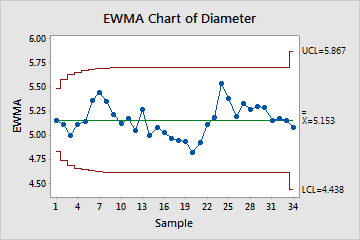
EWMA Exponentially Weighted Moving Average Chart
EWMA Chart image by Minitab

The user gives each output (previous sample mean) a weighting. The most recent samples are weighted the highest. This means you give the oldest data the least amount of weight. The weights drop off geometrically as the data get older. This gives the advantage of the chart not being greatly affected when a small or large value enters the calculation.

The EWMA chart will detect shifts of .5 sigma to 2 sigmas much faster than Shewhart charts with the same sample size. They are, however, slower in detecting large shifts in the process mean.

Another advantage is that each data point plotted on the chart represents a moving average of points. Because each plotted point is a weighted average, the chart is fairly robust to non-normal data. This is the same idea behind the Central Limit Theorem.

Use EWMA Charts When:

  • When you have continuous data from the entire life of a process.
  • You want to detect small shifts in the process. For larger shifts, use Shewhart style charts like the X Bar R and the X Bar S charts.
  • When you want to measure the mean, monitoring the process variability requires the use of some other technique.
  • The subgroup size can be 1 (individual values) or more than 1 (subgroup means).
  • When you want to smooth out the effect of uncontrollable noise in the data.

How to Make an EWMA Control Chart

  • Decide the weightings
    • Use smaller weightings to discern smaller shifts.
    • Set between 0 and 1.
      • If you pick a weighting of 1, you have an xbar chart.
    • Based on user experience and preference.
  • where 0 < λ ≤ 1
  • We also need to define a starting value of Z0 before the first sample is taken. If a target value µ is specified, then Z0 = µ. Otherwise, it is typical to use the average of some preliminary data. That is, Z0 = Xbar
  • Create the control limits
    • Generally, default to 3 standard deviations for Six Sigma quality purposes and to match what other charts generally do.
    • May need to change the control limits to something smaller if the weightings are very small.
  • UCL = µ + Lσ√(λ/(2-λ))
  • LCL = µ – Lσ√(λ/(2-λ))
  • Where L is the width of the control limits, in standard deviations. L is often set to 3, or use page 5 of Lucas and Saccucci
  • Plot the points
    • Can be either subgroups or individual observations.
      • When plotting a subgroup, use the mean of that subgroup.
  • See if the points are within the control limits.
  • Look for trends or patterns.

Examples of Uses of EWMA Control Charts

  • Detecting drift that is caused by tool wear
    • Ex. Manufacturer produces a widget of a certain diameter. If the diameters of the widget are off, there are consequences. Measuring using an EWMA Chart helps understand the manufacturing machine wear and its impact on the creation of the widgets.
  • Accounting processes
    • Ex. Day-to-day fluctuations in accounting processes may be large but may not necessarily mean the process is unstable. The choice of lambda can be determined to make the chart more or less sensitive to these daily fluctuations.
  • Chemical processes
  • Website visitors fluctuate depending on the day of the week. Remove the weekly pattern first, for example by charting week-over-week values or residuals.
    • Ex. This website gets far more visitors when people are at work Monday through Thursday compared to Friday, the weekends, or holidays.

Important Notes on EWMA Charts

  • Your data must be time-ordered.
  • Estimate sigma from moving ranges of two consecutive points (MR-bar/1.128).
  • Created for normal data but is robust enough for non-normal data sets.

Example of Using an EWMA – Exponentially Weighted Moving Average – chart in DMAIC

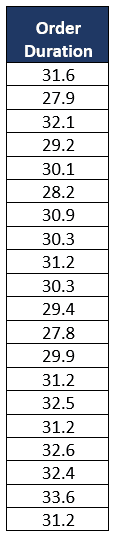
Generate an Exponentially Weighted Moving Average (EWMA) chart based on the cycle time data, depicting the processing duration for customer orders in a car showroom over a specified period. The chart should have a target mean value of 30, a standard deviation of 2.13, and a smoothing factor (λ) set to 0.3.

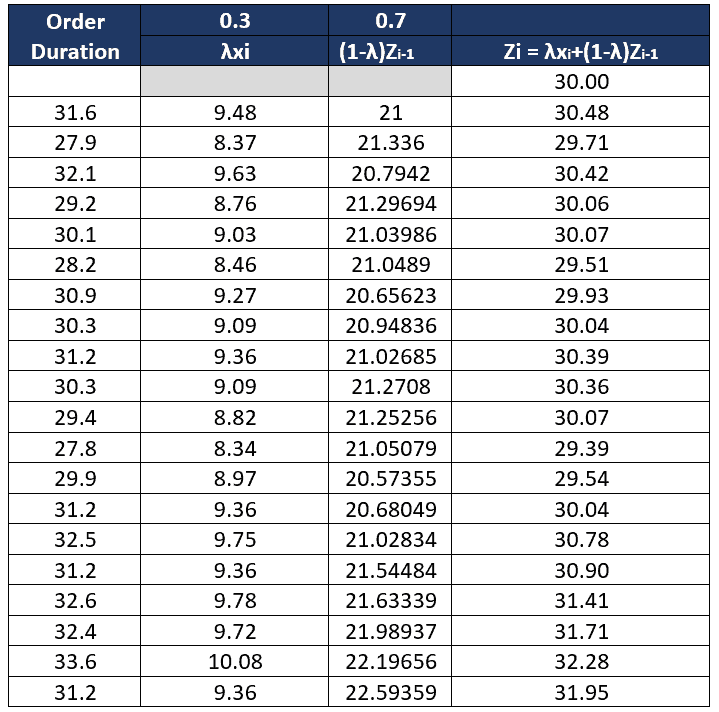
Calculate EWMA (Zi) values

EWMA - Exponentially Weighted Moving Average Chart
  • First value Z0 = µ , Z0 = 30
  • Second value (31.6) Z1 = (0.3*31.6)+(1-0.3)*30= 30.48
  • Third value (27.9) Z2 = (0.3*27.9)+(1-0.3)*30.48= 29.71
  • Similarly, calculate EWMA values for the rest of the duration

Calculate UCL and LCL

  • Where µ=30
  • L =3
  • σ =2.13
  • λ=0.3
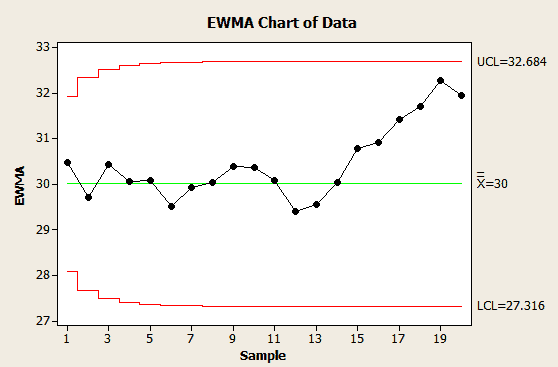
  • UCL = µ + Lσ√(λ/(2-λ)) = 30+3*2.13*Sqrt(0.3/1.7) = 32.684
  • LCL = µ – Lσ√(λ/(2-λ)) = 30-3*2.13*Sqrt(0.3/1.7) = 27.316

Compute the EWMA chart using Excel or any statistical software such as Minitab

Conclusion: No parameter in the EWMA chart falls outside the control limits. Therefore, based on the established control limits, the process is considered stable during the observed time period. This means that the variation in cycle time is within the expected range, given the selected smoothing parameter (λ=0.3) and control limits.

In the Control phase, it’s essential to continue monitoring the process over time and take corrective actions if any new patterns or points outside the control limits emerge. If the process remains stable and meets performance expectations, it can be considered successfully controlled. If further improvements are necessary, further analysis and improvement efforts may be required.

EWMA Excel sheet

What You Need to Know for Your Exam

Green Belts

The IASSC Green Belt BOK requires you to know EWMAs as part of Statistical Process Control.

Black Belts

The Villanova Black Belt BOK requires you to know EWMAs as part of Advanced Statistical Process Control; “Understand appropriate uses of short-run SPC, EWMA, CuSum, and moving average.“

The IASSC Black Belt BOK requires you to know EWMAs as part of Statistical Process Control.

EWMA – Exponentially Weighted Moving Average – Videos

ASQ Six Sigma Black Belt Moving Average Questions

Question:  Which of the following charts plots the mean of a set of values and recalculates the mean with each new value?

(A) Moving range
(B) Moving average
(C) X Bar and s
(D) c

Answer:


Unlock Additional Members-only Content!

To unlock additional content, please upgrade now to a full membership.

Upgrade to a Full Membership

If you are a member, you can log in here.