

Nobody likes to wait. In a clinic it is the waiting room. In an office it is the approval that sits in someone’s inbox for three days. On a website it is the blank screen before the words show up.
Friday Kaizen is my weekly note on how Six Sigma ideas get used in real work. Last week was 5S. This week is two of the classic wastes, waiting and overprocessing, and where we found them in our own web pages.
Our most-read article made phones wait for files it did not need
Our most-read article explains process capability, Cp and Cpk. It is a long page with years of reader comments under it.
In October I ran Google’s page test on it in phone mode. I did not like what I saw.
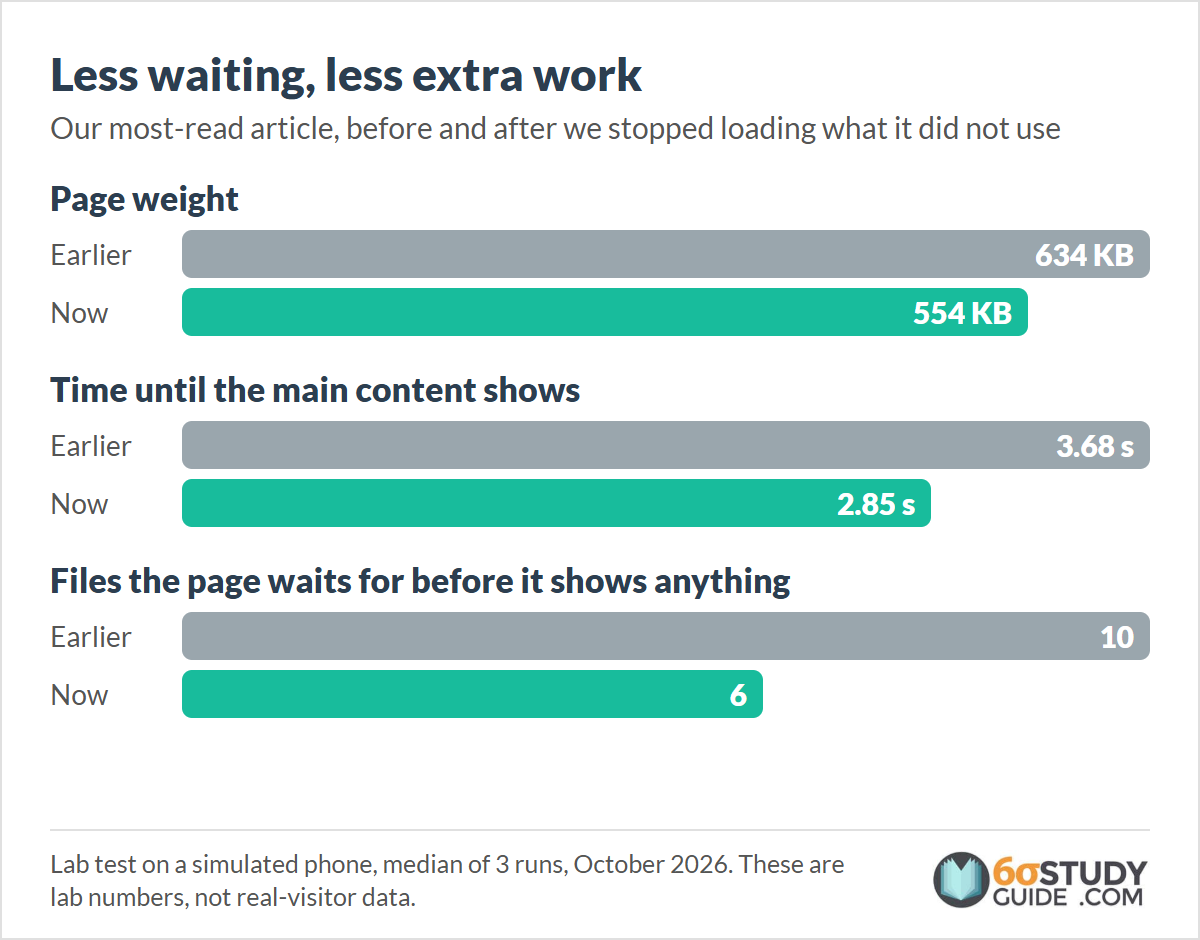
So we measured it properly: three lab runs on a simulated phone. The phone waited 3.68 seconds before the main content showed. The page weighed 634 KB. Before it could show a single word, the browser had to fetch 10 files.
Some of those files had nothing to do with reading the article. One was an icon set, fetched from another company’s server, for the author box at the very bottom of the page. Another was a script that only does something inside the site’s admin screens.
The home page had the same pattern. In September, a check of the home page counted 20 files it had to load before showing anything. Its banner was a photo saved in an old image format: 56 KB for a picture that looks the same at half that size.
Waiting and overprocessing: two classic wastes in a web page
Waiting is time when the work, or the customer, sits idle until something else finishes. Overprocessing is doing more work than the customer needs: an extra sign-off, a report nobody reads, a heavier file than the job calls for.
The two often travel together. Extra work at one step makes someone wait at the next.
On a web page, both are easy to see once you look. Every file the browser must fetch before it shows the words is a wait. Every file it fetches for something that is not on the page is overprocessing.
What the waiting costs a reader
A reader on a phone sees a blank screen. Some wait. Some tap back and pick the next search result.
Each wait is small. But it happens every time, for everyone who opens the page, and the most-read article is opened more than any other.
What we did: stop loading what the page does not use
We worked in small batches between late September and mid-October.
September. We stopped loading files from a developer tool that had been loading on every page, and a second copy of an icon set that articles loaded twice. The home page went from 20 must-load files to 11.
October. Scripts from outside services now wait until the page has shown. The icon set from another company’s server came out of the articles; the author box never used it. The author box styles now load without holding up the rest of the page. The admin-only script stopped loading for readers. The home banner became the same picture in a newer format, 26 KB instead of 56 KB.
Before each change went live, we compared the page before and after, element by element, to check that readers would see the same page.
The result on the most-read article, in the same lab test (median of 3 runs): the main content showed 0.8 seconds sooner, 3.68 to 2.85 seconds. The page went from 634 KB to 554 KB. The files it waits for before showing anything went from 10 to 6.
Those are lab numbers. A lab test is one simulated phone on one network. What matters is what real visitors get, and Google reports that in 28-day windows. The first window that starts after these changes closes this week. Early readings point the same way, but they still mix in days from before the change, so I am holding those numbers until the window is clean.
Try it this week: time one request from ask to answer
Pick one request your team handles often. It works in any kind of work:
- Office: a purchase approval, an expense claim or a new starter’s laptop.
- Service: a quote, a support ticket or a referral.
- Shop floor: a lab sample, a maintenance call or a part from the stores.
Follow one request from start to finish. Write down the clock time at every handoff. Then mark each stretch: someone working on it, or it waiting.
Add up the working time and the waiting time. Then look at each work step and ask: did the customer need this? A second sign-off, a form field nobody reads and a report that goes straight to a folder are all candidates.
Pick the longest wait and ask what it is waiting for. Start there.
Leave a comment and tell me what your longest wait was. I read these, and the good ones might show up in a future Friday Kaizen (only with your permission).
Best, Ted.
“The SixSigmaStudyGuide.com really saved me time and energy. It is a great tool to have when balancing family and work, as well as providing study material in the form of text, videos, and examples.”
Nathan G., LinkedIn Recommendation
When you’re ready, there are a few ways I can help:
First, join 12,000+ other Six Sigma professionals by subscribing to my email newsletter. A short read every Monday to start your work week off correctly. Always free.
* * *
If you’re looking to pass your Six Sigma Yellow Belt, Green Belt or Black Belt exam, I’d recommend starting with my affordable study guide:
1)→ 🟡Pass Your Six Sigma Yellow Belt: built for ASQ, IASSC and ILSSI, 1,700+ practice questions with explanations, and six full-length mock exams for your exam
2)→ 🟢Pass Your Six Sigma Green Belt: a study guide organized by the exam Body of Knowledge, 1,000+ practice questions with detailed answer explanations, and 15+ full-length mock exams
3)→ ⚫Pass Your Six Sigma Black Belt: the full Black Belt Body of Knowledge, 2,000+ practice questions with detailed answer explanations, and 15+ full-length mock exams
You’ve spent so much effort learning Lean Six Sigma. Why leave passing your certification exam up to chance? This comprehensive study guide offers 1,700+ exam-like questions for Yellow Belts, 1,000+ for Green Belts and 2,000+ for Black Belts with full answer walkthroughs, access to instructors, detailed study material, and more.
Thousands have used this system to prepare. Join them here.