
Binomial Distribution

What is Binomial Distribution?

A Binomial Distribution describes the probability of an event with only two possible outcomes. For example, Heads or Tails.

It can also be used to describe the probability of a series of independent events that only have 2 possible outcomes occurring. For example: Flipping a coin 10 times and having it land with 5 on heads exactly 5 times. Or, flipping a coin 10 times and having it land on heads at least 5 times.

Furthermore, the probability of an event with n trials and f failures follows a binomial distribution.

Visualizing Binomial Distribution

The Binomial Distribution looks like so when graphed:

Probability mass function for the binomial distribution
By Tayste – Own work, Public Domain, Link

When Would You Use Binomial Distribution?

Requirements and Conditions for a Binomial Distribution

  • Must be a fixed number of trials.
  • Continuous data are not binomial.
  • The probability of success should be the same on every trial, and also, the probability of success is constant.
  • Two states: Two possible outcomes.
    • (true or false, hot or cold, success or failure, defective or not defective.)
  • Independent trials: trials are statistically independent.
    • (For example: The flip of one coin means nothing to the results of the next coin flip.)
  • Use Binomial Distribution when you are sampling with replacement.

You Cannot Use Binomial Distribution On:

  • When the probability of success is not constant for an event.
    • Ex. The probability of it snowing or not snowing in NYC would not fit the criteria for a Binomial Distribution because the probability of success is not constant. The chance of snow on winter days is higher than on summer days.
  • When you sample WITHOUT replacement.

Cumulative vs. Non-Cumulative

There are (2) ways I’ve seen Binomial Distribution Problems be represented in Six Sigma Exams:

  • Non-cumulative questions
  • Cumulative questions (with or without a chart)

The questions can either be about the actual equations, like translating a word problem into an actual solution. Or they can be about the necessary scenarios when you would apply binomial probability – in other words, what MUST be true to use it, or if an event is binomial, what can we infer about its properties?

Non-Cumulative Probability

This is just a fancy statistics term for single events taken on their own.

Example: a single flip of a coin.

Cumulative Probability

Another fancy statistics term for multiple events. I like to remember that Cumulative events literally accumulate multiple probabilities.

One thing to be aware of is that you can be asked to either manually calculate a binomial cumulative probability question or you could be asked to use a chart.

Notes About Sampling With Replacement

The Binomial is for N trials and F failures. It describes the probability of k successes in n draws with replacement from a finite population of size N containing exactly K successes.

Remember, the binomial is for independent events where the likelihood of each event occurring is the same as the others. If you sample without replacing, you’re affecting the likelihood of independence.

This contrasts the hypergeometric distribution, which describes the probability of k successes in n draws when sampling without replacement.

Examples of Binomial Distribution Problems

Non Cumulative Binomial Probability

Non-Cumulative Calculation Example 1: “Contains Exactly”

If a coin is tossed 10 times, what is the probability of obtaining exactly four heads? (If an honest coin is tossed 10 times, what is the probability of 4 heads?)

With a coin toss, there are only 2 possible outcomes; heads or tails. So you should be on alert for using a binomial.
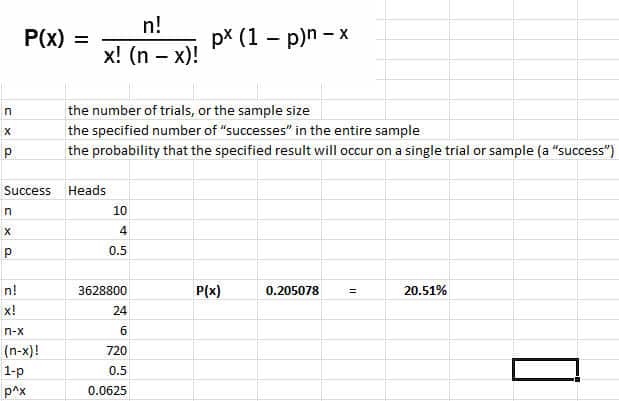
binomial successes
binomial successes

Non-Cumulative Calculation Example 2: “Contains Exactly”

A manufacturing process creates 3.4% of defective parts. A sample of 10 parts from the production process is selected. What is the probability that the sample contains exactly 3 defective parts?

When you see the word defective, you should be alert to use the Binomial equation. Since defect, in this sense, means that a part is in a binary state, either functioning or defective, it meets our criteria.
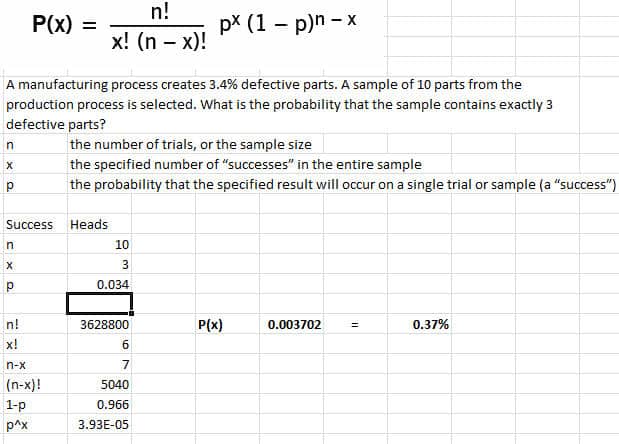
binomial successes 2

Non-Cumulative Calculation Example 3: “Contains Exactly”

Forty-five percent of all registered voters in a national election are female. A random sample of 8 voters is selected. The probability that the sample contains 2 males is:

Since this question assumes that there are (2) biological genders measured, male or female, you should be on alert to use the binomial distribution.
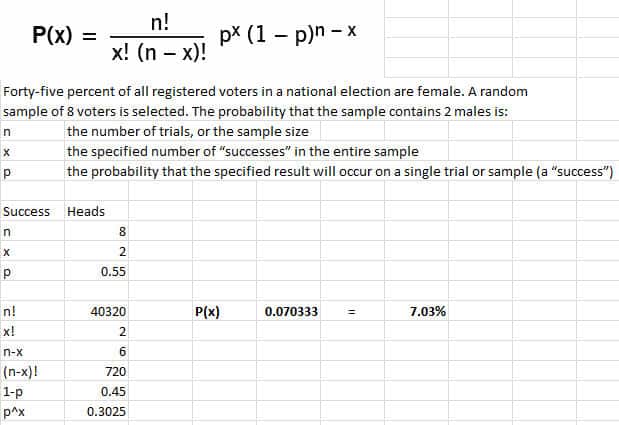
binomial successes 3

Non-Cumulative Chart Example: 

You can see that the same percentage was found on the chart. (In this case, x is the probability of the event happening instead of p.)

Examples of Cumulative Binomial Probability Questions

Cumulative Calculation Example: “At least” or “Fewer Than” or “At Most”

79% percent of the students of a large class passed the final exam. A random sample of 4 students is selected to be analyzed by the school. What is the probability that the sample contains fewer than 2 students that passed the exam?

Since we are examining data that only has a binary state, pass or fail, you should be on alert to use the binomial equation.

Also, since you’ve asked for ‘x or fewer,’ you must calculate the probability of ALL POSSIBLE events.

In this example, we must calculate the odds of EXACTLY one pass PLUS the odds of EXACTLY no pass in the sample.
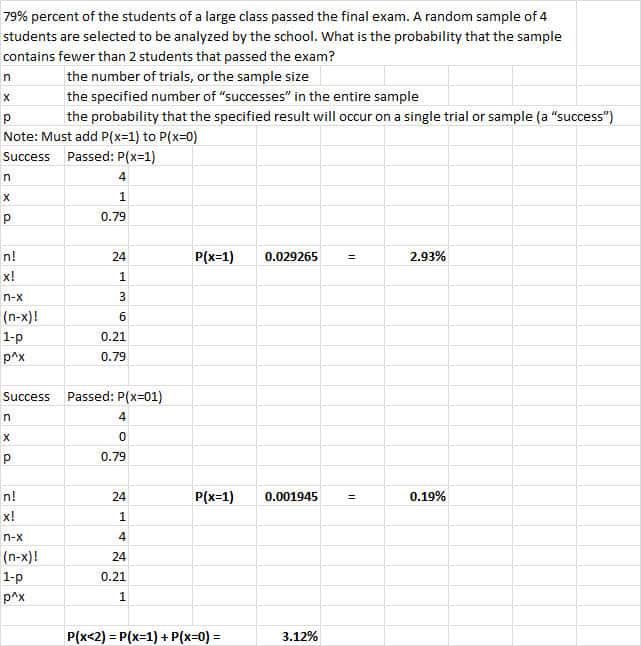
binomial successes 4

Cumulative Calculation Example: “More than”

An example of this kind of question is “Test the probability of the number of dropped calls will exceed a certain number.”

Here you’d do the opposite of the “Fewer” example above and count the probabilities.

So, if we rewrote the question above to be ‘What’s the probability of sampling 10 students and 8 or more passed,’ it would be the probability of EXACTLY 8 passing, PLUS EXACTLY 9 passing, PLUS EXACTLY 10 passing.

Binomial Probability Questions Short Cuts

This can be a LOT of calculations. Fortunately, there are some shortcuts:

Factorial Math Shortcuts:

I find that many of these binomial questions can be made easier by reducing the factorials by canceling out terms before you plug them into the calculator.

Just for the sake of simplicity, let’s say that you have 5! / 3! If you write that out by hand, it’s essentially (5*4*3*2*1 / 3*2*1). Also, you can eliminate a lot of the terms by recognizing this and rewriting 5! / 3! as 5*4.

Distribution table Shortcuts:

Binomial Probability Charts

Here are some good references:

Binomial Chart Question Example: (Without Calculations)

  • If I were using a Binomial Distribution Table, which values of X would I add together to get the probability of at most N defective?
    • You would add the probabilities of N, n-1, n-2… all the way to zero.
    • For Example, “Which values of X would I add together to get the probability of at most 4 defective?”
      • Add the probabilities of 4 + 3 + 2 +1 + 0.

Binomial Chart Question Example: (“More Than”)

Let’s assume that 20% of drivers on the road have NO car insurance. What is the probability that more than 7 out of a sample of 15 people have no car insurance?

  1. Find n = 15 in the first column on the left.
  2. And then, find the column containing p = 0.20.
  3. Find the 7 in the second column on the left since we want to find F(7) = P(X ≤ 7).

Now, all we need to do is read the probability value where the p = 0.20 column and also the (n = 15, x = 7) row intersect. What do you get?
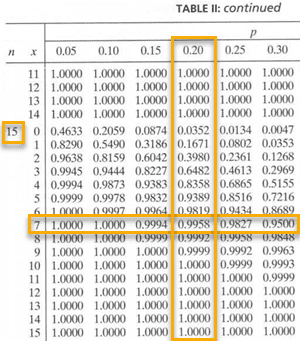
So, the cumulative binomial probability table tells us that P(X ≤ 7) = 0.9958. Therefore: P(X > 7) = 1 − 0.9958 = 0.0042

That is, the probability that more than 7 in a random sample of 15 would have no car insurance is 0.0042

Example of Using Binomial Probability in a Six Sigma Project

Typically in a Six Sigma project, you are using DMAIC methodology. Let’s say during the Define Phase you chartered a project to see if you could improve a process that had a binomial outcome. You might even use the Binomial Distribution to articulate the business case for why you should do the project in the first place, for instance, event A should be binomial, but it’s clearly not.

You might use the binomial distribution to see if samples of the process outcome followed a binomial distribution during the Analysis phase.

If you are running a pilot implementation during the Improve Phase, you might make the assumption that some events that are inputs to your process in fact will follow a binomial distribution.

Also, In the Control Phase, you might monitor that a specific process generates binomially distributed results if it should.

What You Need to Know for Certification

Six Sigma Green Belts

The ASQ Six Sigma Green Belt BOK requires:

Probability distributions
Describe and interpret normal, binomial, and Poisson, chi square, Student’s t, and also F distributions. (Apply)

Six Sigma Black Belts

The ASQ Six Sigma Black Belt BOK Requires:

Commonly used distributions

Describe, apply and interpret the following distributions: normal, Poisson, binomial, chi square, Student’s t and F distributions. (Evaluate)

The Villanova Six Sigma Black Belt BOK requires the following

Advanced statistical process control

Distributions commonly used by black belts. Describe and apply binomial, Poisson, normal, chi-square, Student’s t, and F distributions.

Videos on Binomial Distributions

Additional Helpful Resources

Hypothesis Testing with Binomial Distribution
Box Cox Transformation

What is the Box Cox Transformation?

A Box Cox Transformation is a simple calculation that may help your data set follow a normal distribution. Box Cox transformation was first developed by two British statisticians, namely George Box and Sir David Cox.

When the assumption of data normally distributed is violated, or the relationship between the dependent and independent variables in the case of a linear model is not linear, in such situations some transformation methods may help the data set follow a normal distribution. Box Cox is one such transformation method.

The basic assumption of Box-Cox is data must be positive (no negative values) and also data should be continuous.

What Does Box Cox have to do with Multiple Regression Analysis?

Box-Cox transformation is the basic tool in Multiple Regression Analysis. The assumption of any linear model is that relationship between the response variable Y, and the predictor variable X is linear; however, this is not true all the time, so when the relationship between the dependent variable and independent variable is not linear and still wish to fit a linear model to the data then consider a Box-Cox transformation method. This will transform the predictor variable or the response variable and then fit a linear model to the data to study the predictor variable’s effect on the transformed responses.

We assume that linear models have normally distributed error terms, a basic assumption. Significant violation of the assumption also leads to committing the type I or type II error.

In addition, the benefits of Box-Cox transformation include less skewness, maintaining the linear relationship between response variable Y and the predictor variable X’s, almost equal spread, etc.,

The Box Cox Equation

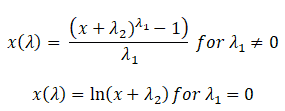
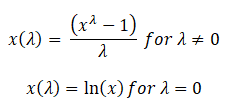
The original form of the Box Cox transformation is given by

Box Cox Transformation

In a 1964 paper, Box-Cox proposed an extended form of the two-parameter Box-Cox transformation

Box Cox Transformation

When would you use this transformation during the DMAIC process?

Process capability studies are performed during the Measure phase of DMAIC. The first step for process capability studies is to check whether the data follows normal distribution or not (it is more important for parametric tests like ANOVA etc.).

The Box-Cox method helps to address non-normally distributed data by transforming it to normalize the data. However, there is no guarantee that data follows normality because it does not really check for normality.

The Box-Cox method checks whether the standard deviation is the smallest or not. Hence it is always advisable to check the transformed data for normality using a probability plot or Q-Q(Quantile-Quantile) plot.

How to use Box Cox to calculate Process capability for non-normal data

There may be no advantage in calculating the process capability for non-normal raw data, in other words, it may give inaccurate results. Data should be transformed to normalize before calculating the process capability. While there are various data transformation methods exist like log transformation, power transformation, Exponential, Reciprocal, etc.,

In order to use the right transformation method, some data analysis may be required. One of the foremost power transformation methods is the Box-Cox method.

The formula is yI = yLambda

Where Lambda power must be determined to transform the data, the usual assumption of parameter Lambda values varies between -5 and 5. The likelihood of transformed data is maximum, and data are normally distributed when the standard deviation value is small.

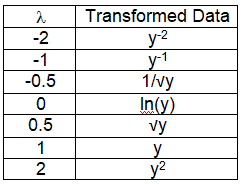
Most Common Box-Cox Transformations

Box Cox Transformation

Example: if the Lambda is 2 then yLambda = y2

An Example of a Box Cox Transformation by Hand

Box Cox transformations in practice are typically done by leveraging software that can try many different variations of Box Cox transforms very quickly.

Doing it by hand in practice is time-consuming and error-prone. Imagine trying varying types of lambda by hand until you run them all or run out of patience!

“But what about on a Six Sigma exam?” I can hear you say. “I won’t have MiniTab or R Studio available! What will I do?”

Not to worry.

In my experience, the questions on the exam are rather simple. You’re usually just having to do or understand the following:

  • Sometimes your data doesn’t appear to be normal, but if you transform it, you can achieve normality, which then opens up a bunch of other properties and tools for you (or at least easier tools;’)).
  • While Box-Cox is complex, questions on Six Sigma exams are usually very simple. Just substitute variables into the following equation:
    • X(transform) = X ^ Lambda

Example: if the Lambda is 2 then yI = y2

You must replace your original data with the “new equation” using a lambda of 2.

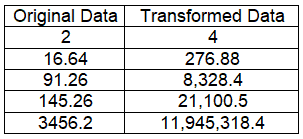
As the example chart here shows, all you’d have to do is just square the original value.

“Old measure” 2 now becomes “New measure” 4 because we are substituting into X(transform) = X ^ Lambda for the following: X(2) = 2 ^ 2.

An Example of a Box-Cox Transformation Using Minitab

An Example of a Box-Cox Transformation Using Minitab

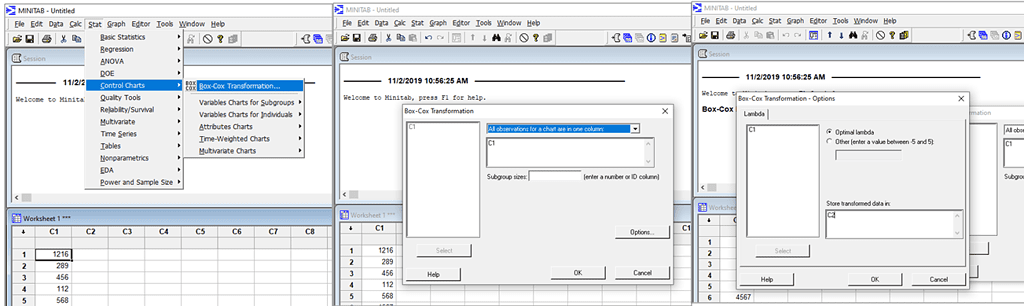
Box Cox Transformation in Minitab tool, Excel Analysis tool pack, or any other statistical software tools. These tools automatically calculate an appropriate power transformation

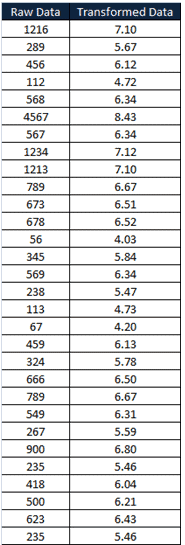
Example: Raw data

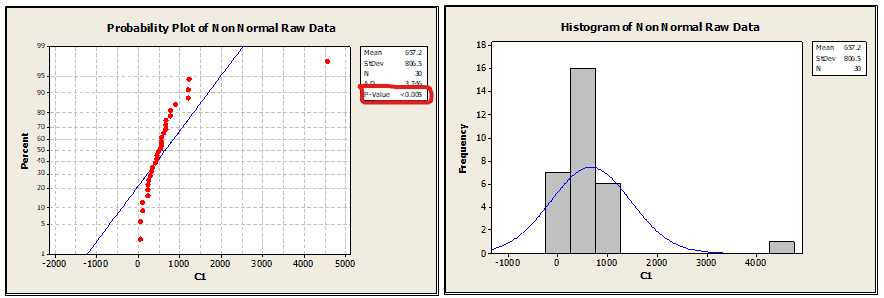
Step 1: Perform the normality test to see whether the data follows normal distribution or not

Box Cox Transformation 4

From the above graph, the P value is less than 0.005; hence the data does not follow a normal distribution, and the histogram clearly shows data skewed on one side.

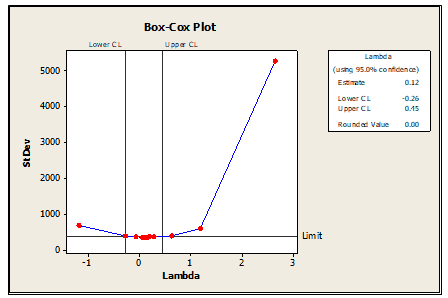
Step 2: Transform the data using Box-Cox Transformation

Box Cox Transformation 3
Box Cox Transformation 2

Transformed data

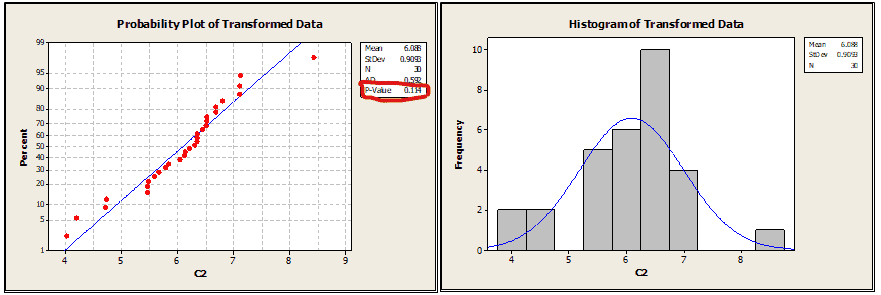
Step 3: Again test the normality

Box Cox Transformation 1

From the above graph, the p-value is greater than 0.05; hence it is clear that the data follows a normal distribution, and from the histogram also, we can see the data is uniformly distributed.

What Do You Need to Know for Your Six Sigma Exam?

Green Belt

The IASSC Six Sigma Green Belt BOK requires as part of the Improve Phase.

Black Belt

The IASSC Six Sigma Black Belt BOK requires as part of the Improve Phase.

The ASQ Six Sigma Black Belt BOK requires the following:

Process capability for non-normal data
Identify non-normal data and determine when it is appropriate to use Box-Cox or other transformation techniques. (Apply)

Helpful Videos

This first video has poor audio but gives a good overview.

This second video shows a great practical example of leveraging R studio. You’re unlikely to have to go into this level of detail on an exam. I include it because it’s a great example with very helpful plots of data that help you visualize what a transformation can do to help you progress through your data analysis and come to viable conclusions.

When you’re ready, there are a few ways I can help:

First, join 12,000+ other Six Sigma professionals by subscribing to my email newsletter. A short read every Monday to start your work week off correctly. Always free.

* * *

If you’re looking to pass your Six Sigma Green Belt or Black Belt exams, I’d recommend starting with my affordable study guide:

1)→ 🟢Pass Your Six Sigma Green Belt: a study guide organized by the exam Body of Knowledge, 1,000+ practice questions with detailed answer explanations, and 8 full-length mock exams

2)→ ⚫Pass Your Six Sigma Black Belt: the full Black Belt Body of Knowledge, 2,000+ practice questions with detailed answer explanations, and 8 full-length mock exams

You’ve spent so much effort learning Lean Six Sigma. Why leave passing your certification exam up to chance? This comprehensive study guide offers 1,000+ exam-like questions for Green Belts (2,000+ for Black Belts) with full answer walkthroughs, access to instructors, detailed study material, and more.

​ Thousands have used this system to prepare. Join them here. 

Coefficient of Variation (CV): Formula, Calculation & Examples

If you have ever compared two machines, two shifts, or two suppliers and found yourself saying “well, their standard deviation is bigger, but they’re also making a bigger part, so is that really worse?”, you were reaching for the Coefficient of Variation, even if you didn’t know its name yet. The Coefficient of Variation (CV) is the tool that lets you compare variability fairly across datasets that don’t share the same scale, the same units, or the same average.

Standard deviation on its own only tells you how spread out a dataset is in its own units. It can’t tell you whether that spread is a big deal or a small deal relative to the size of what you’re measuring. The Coefficient of Variation fixes that by expressing variability as a percentage of the mean, which makes it one of the most useful, and most underused, measures of dispersion in a Six Sigma practitioner’s toolkit.

What Is the Coefficient of Variation?

The Coefficient of Variation is the standard deviation of a dataset divided by its mean, expressed as a percentage. It is also called relative standard deviation (RSD), which is a more descriptive name: it tells you how large the standard deviation is relative to the average value, rather than in absolute terms.

Because it’s a ratio of two quantities measured in the same units, the units themselves cancel out. A CV is always a pure percentage, with no unit attached, regardless of whether the underlying data was measured in millimeters, minutes, dollars, or defects per unit. That’s what makes it so useful for comparing variability across datasets that would otherwise be impossible to compare directly.

Where the Coefficient of Variation Comes From

The Coefficient of Variation isn’t a modern Six Sigma invention, it dates back to the statistician Karl Pearson in the mid-1890s. Pearson was studying anthropometric data (physical measurements of people) and ran into exactly the same problem Six Sigma practitioners run into today. He needed to compare the variability of groups with meaningfully different average sizes, in his case different average body measurements. A raw standard deviation couldn’t answer that question fairly, so he devised a dimensionless ratio, the standard deviation divided by the mean, that could. More than a century later, it’s the exact same tool you’d reach for to compare a small-parts line against a large-parts line, or a lab instrument’s precision against a different lab’s instrument measuring on a different scale.

Coefficient of Variation Formula

There are two versions of the formula, depending on whether you’re working with a full population or a sample, the same distinction that applies to standard deviation generally.

ScenarioFormulaSymbols
PopulationCV = (σ / μ) × 100%σ = population standard deviation, μ = population mean
SampleCV = (s / x̄) × 100%s = sample standard deviation, x̄ = sample mean

In practice, almost every CV you calculate on the job will use the sample formula, since you’re almost always working from a sample of a process rather than every unit that process has ever produced or ever will.

Why Not Just Use Standard Deviation?

Here’s the problem CV solves. Suppose you run two production lines.

  • Line A fills small bottles. Mean fill weight = 50 grams, standard deviation = 2 grams.
  • Line B fills large drums. Mean fill weight = 5,000 grams, standard deviation = 40 grams.

Line B’s standard deviation (40 grams) is 20 times larger than Line A’s (2 grams). At a glance, that looks like Line B has a much bigger variability problem. But look at the CV instead:

  • Line A: CV = 2 / 50 × 100% = 4%
  • Line B: CV = 40 / 5,000 × 100% = 0.8%

Relative to what each line is actually producing, Line B is five times more consistent than Line A, the exact opposite conclusion you’d draw from the raw standard deviations. This is the core reason CV exists: standard deviation answers “how spread out is the data,” while CV answers the more useful question, “how spread out is the data, relative to what’s typical for this process.”

Worked Example: Calculating the Coefficient of Variation

Suppose a Green Belt is measuring cycle time, in minutes, for a customer service call center. A sample of 8 calls gives the following handle times:

4.2, 5.1, 3.8, 6.0, 4.5, 5.5, 4.0, 4.9 (minutes)

Step 1: Calculate the mean. Add the 8 values and divide by the count: (4.2 + 5.1 + 3.8 + 6.0 + 4.5 + 5.5 + 4.0 + 4.9) / 8 = 38.0 / 8 = 4.75 minutes.

Step 2: Calculate each deviation from the mean, then square it. This is the same groundwork you’d do to find the standard deviation on its own:

Call Time (x)Deviation (x − mean)Squared Deviation
4.2−0.550.3025
5.10.350.1225
3.8−0.950.9025
6.01.251.5625
4.5−0.250.0625
5.50.750.5625
4.0−0.750.5625
4.90.150.0225

Step 3: Sum the squared deviations and divide by n − 1 (we’re working from a sample, so we use n − 1, not n). The squared deviations sum to 4.1. Dividing by (8 − 1) = 7 gives a sample variance of 4.1 / 7 ≈ 0.586.

Step 4: Take the square root to get the sample standard deviation. √0.586 ≈ 0.765 minutes.

Step 5: Divide by the mean and convert to a percentage. CV = (0.765 / 4.75) × 100% ≈ 16.1%.

That 16.1% is now a portable number. It can be compared directly to the CV of a completely different call center, a different queue, or even a different metric entirely, like order-processing time measured in seconds, something a raw standard deviation of “0.765 minutes” could never do on its own.

Interpreting a Coefficient of Variation

A lower CV means the data clusters more tightly around the mean, relative to the size of the mean; a higher CV means more relative spread. Several rough rule-of-thumb bands show up across different industries and textbooks, but it’s important to treat them as context-dependent heuristics, not universal statistical law. There is no single, official cutoff where “moderate” becomes “high.”

CV RangeTypical Interpretation
Under ~10%Low relative variability (common target in lab/measurement settings)
~10% to 20%Moderate relative variability (often acceptable in field/process settings)
~20% to 30%Elevated; context-dependent, investigate the source of variation
Above ~30%High relative variability by most conventions

What counts as acceptable in a precision laboratory measurement (often under 10%) would be considered tight for a messier, human-driven service process (where 15-20% might be a realistic, perfectly healthy target). Always set your own threshold based on the process, the customer’s requirements, and what’s actually achievable, rather than importing a number from an unrelated industry.

Coefficient of Variation vs. Standard Deviation vs. Variance

These three measures of spread are closely related, but they answer different questions:

  • Variance is the average of the squared deviations from the mean. It’s mathematically foundational (it’s what you calculate first to get standard deviation), but its units are squared, which makes it hard to interpret directly. If your data is in minutes, variance is in minutes squared.
  • Standard deviation is the square root of variance, which brings the units back to the original scale. It’s the most commonly reported measure of spread, and it’s the right choice when you’re only looking at one dataset, or comparing datasets that share the same units and a similar mean.
  • Coefficient of Variation is standard deviation expressed as a percentage of the mean. It’s the right choice specifically when you need to compare variability across datasets with different units, different scales, or meaningfully different means.

In short: use variance when you need it as a stepping stone to another calculation, use standard deviation as your everyday measure of spread, and reach for CV the moment you need to compare apples to oranges.

When Six Sigma Practitioners Actually Use CV

CV shows up in a handful of specific, practical situations on a Six Sigma project:

  • Comparing variability across product lines with different target sizes. A process making 2-inch bolts and a process making 12-inch bolts will naturally have different absolute tolerances and different standard deviations; CV lets you ask “which process is relatively more consistent” without that size difference distorting the answer.
  • Comparing the same metric across very different volumes. A high-volume product line will often show a larger raw standard deviation than a low-volume line purely because of its scale; CV normalizes that away.
  • Benchmarking measurement systems. Some Gage R&R and lab-precision studies report %RSD (CV) alongside, or instead of, raw standard deviation, specifically because it’s portable across instruments measuring different magnitudes.
  • Supplier and vendor comparisons. If two suppliers report defect rates, cycle times, or dimensional data with different average outputs, CV gives you an apples-to-apples read on which one is actually more consistent, not just which one has a smaller number on paper.

Calculating CV in Excel or Minitab

You rarely need to do the squared-deviation arithmetic by hand once you’re working with real data. In Excel or Google Sheets, with your data in cells A2:A9, the whole calculation is one formula:

=STDEV.S(A2:A9)/AVERAGE(A2:A9)*100

Use STDEV.S for a sample (the far more common case) or STDEV.P if you have the entire population, not a sample of it. In Minitab, CV is available directly as an option inside Stat > Basic Statistics > Display Descriptive Statistics, listed in the output alongside the mean and standard deviation, so you don’t need to build the formula manually at all.

Common Mistakes and Limitations

CV is a simple calculation, but it’s easy to misuse. Watch for these pitfalls:

  • Don’t use CV when the mean is at or near zero. Because the mean is in the denominator, a mean close to zero produces a CV that blows up toward infinity or becomes wildly unstable, even for a perfectly normal, well-behaved dataset. Profit margins, temperature changes, and other measures that can be positive, negative, or zero are poor candidates for CV.
  • CV only makes sense for ratio-scale data. A ratio scale has a true, meaningful zero, like length, weight, time, or money. Interval-scale data, like temperature in Celsius or Fahrenheit, does not have a true zero (0°C isn’t “no temperature”), so a CV calculated on Celsius data will change if you switch to Fahrenheit, even though nothing about the underlying variability has changed. That makes it meaningless for interval-scale measurements.
  • Don’t compare a CV calculated on raw data to one calculated on already-transformed data (like percentages, index scores, or log-transformed values) without checking that the comparison still makes sense; transforming the data changes what the mean and standard deviation actually represent.
  • Small sample sizes make CV unstable. Like any statistic built from standard deviation, CV calculated from a handful of data points can swing widely from sample to sample. Treat a CV from fewer than about 10 data points as a rough signal, not a precise number.

Case Study: Using CV to Settle a Debate Between Two Shifts

A packaging plant runs two shifts on the same filling line. The day shift and night shift fill different SKUs: the day shift mostly runs a large 2-liter container, and the night shift mostly runs a smaller 500ml container. After a few weeks of complaints that the night shift was “less consistent,” a Black Belt pulled fill-weight data from both shifts.

ShiftMean Fill WeightStandard DeviationCV
Day (2L containers)2,000 g18 g0.9%
Night (500ml containers)500 g12 g2.4%

On raw standard deviation alone, night shift’s 12 grams actually looks better than day shift’s 18 grams. But once the Black Belt converted both to CV, the real picture emerged: night shift’s variability, relative to the much smaller amount it’s filling, was more than two and a half times larger than day shift’s. The complaint about night shift wasn’t unfounded, it was just being argued with the wrong number.

With the real gap quantified, the team could move into root cause analysis on the night shift’s filling equipment specifically, rather than chasing a problem that the raw numbers had been hiding. This is the practical value of CV on a live project: it stops you from comparing processes that look similar on the surface but aren’t actually on the same footing.

How CV Thresholds Differ Across Industries

One of the most common mistakes practitioners make with CV is borrowing a threshold from a field that has nothing to do with their own process. The acceptable range does shift by industry and by what’s being measured, because the underlying risk and achievable precision are different in each case.

  • Analytical and clinical laboratories often hold themselves to CV under 5-10% for repeated measurements of the same sample, because instrument precision at that level is both achievable and necessary; a blood test with 25% relative variability on a repeat draw would be clinically useless.
  • Manufacturing and process industries commonly treat CV under 10% as tight control, 10-20% as workable, and above that as a signal to investigate, though the real target should always come from the customer’s tolerance, not a generic rule.
  • Agricultural and field research routinely accepts CV up to 20%, and sometimes higher, because the sources of variation (weather, soil, biological variability) are much harder to control than in a closed manufacturing process.
  • Service and transactional processes (call handle time, order processing, approval cycle time) often run CVs of 20-40% because human-driven work has more natural variation than machine-driven work, and that is a baseline to improve from, not automatically a defect.
  • Finance and investment risk analysis uses CV to compare the risk-adjusted return of different assets: an investment with a higher CV of returns is considered riskier per unit of expected return, regardless of which currency or scale it’s measured in.

The pattern across every one of these fields is the same: CV is only useful as a comparison tool once you’ve picked the right peer group. Comparing your service process’s CV against a laboratory’s CV tells you nothing useful, they’re not solving the same kind of variability problem.

How CV Relates to Process Capability (Cp and Cpk)

Process capability indices like Cp and Cpk answer a related but different question than CV does. Cp and Cpk compare your process’s spread to a fixed specification width set by the customer or engineering requirement; CV compares your process’s spread to its own mean, with no specification involved at all.

That distinction matters because a process can have an excellent (low) CV and still have poor process capability, if its specification limits are tight relative to its natural variation, and vice versa: a process with a high CV can still be perfectly capable if its specification limits are wide. CV describes how variable a process is relative to itself; Cp and Cpk describe how variable a process is relative to what the customer actually needs. Use CV when you’re comparing processes to each other; use Cp and Cpk when you’re comparing a single process to its own specification.

Frequently Asked Questions

Can the Coefficient of Variation be over 100%?

Yes. A CV over 100% means the standard deviation is larger than the mean itself, which happens with highly skewed data, data with a lot of near-zero or zero values, or small means with large spread. It’s a valid result, not an error, but it’s also a strong signal that the data may not be well-described by a mean and standard deviation at all, and a distribution check is worth doing before drawing conclusions.

Can the Coefficient of Variation be negative?

Standard deviation is always zero or positive, so the sign of CV follows the sign of the mean. A negative mean will produce a negative CV, which is one more reason CV is only meaningful for ratio-scale data (like time, length, weight, or cost) that can’t legitimately be negative or doesn’t cross zero in the first place.

What’s a “good” CV for a Six Sigma project?

There isn’t a single number that applies across every project, and claiming otherwise would be oversimplifying a context-dependent question. The honest approach is to establish a baseline CV for your own process, then track whether your improvement project moves that number down over time, or compare it against a legitimately similar process (same industry, same type of measurement) rather than an arbitrary universal benchmark.

Is CV the same thing as %RSD?

Yes. Relative standard deviation (RSD), usually reported as %RSD, is the same calculation as the Coefficient of Variation. %RSD is the more common name for it in laboratory and analytical chemistry contexts, while “Coefficient of Variation” is the more common name in statistics, manufacturing, and Six Sigma contexts. The formula and the interpretation are identical.

Does my data need to be normally distributed to use CV?

No, CV doesn’t require a normal distribution the way some other statistical tools do. It’s purely a descriptive ratio of two sample statistics (standard deviation and mean), not a test with distributional assumptions behind it. That said, CV is most informative and most stable when the data is reasonably symmetric; on a heavily skewed distribution, the mean itself can be a poor summary of “what’s typical,” which in turn makes a CV built on that mean less meaningful, even though the arithmetic still works. If you suspect skew, it’s worth checking the distribution shape first and considering whether the median and a percentile-based spread measure might describe the data more honestly.

Quick Reference

  • What it is: standard deviation expressed as a percentage of the mean (also called relative standard deviation).
  • Formula: CV = (standard deviation / mean) × 100%.
  • Use it when: comparing variability across datasets with different units, scales, or means.
  • Don’t use it when: the mean is near zero, the data is interval-scale (no true zero), or the sample size is very small.
  • Lower is more consistent; higher is more variable, relative to the mean. There’s no universal cutoff for “good” or “bad,” set thresholds based on your own process and customer requirements.

For more on the building blocks behind this calculation, see Dispersion and Standard Deviation. For how variability measures like this feed into capability analysis, see Process Capability (Cp & Cpk).

ILSSI Green Belt Study Guide

What Is ILSSI?

The International Lean Six Sigma Institute (ILSSI) is a globally recognized certifying body dedicated to promoting best practices in Lean Six Sigma through standardized training and certification programs. Their approach blends the rigor of Six Sigma statistical methods with the adaptability of Lean principles to improve processes across industries.

ILSSI certifications are known for being practical, internationally respected, and aligned with the latest thinking in continuous improvement and operational excellence. They offer certification at all levels, from Yellow Belt to Master Black Belt, with a focus on real-world application and results.

You can learn more about their certification programs at ILSSI.org.


What ILSSI Green Belt Candidates Should Know

To become an ILSSI-certified Green Belt, candidates must demonstrate a deeper understanding of Lean Six Sigma tools beyond the Yellow Belt level. This includes:

  • Mastery of the DMAIC framework
  • Competence in data-driven decision making
  • Proficiency in statistical software such as Excel, Minitab, or SigmaXL
  • Ability to lead small-to-medium improvement projects or support larger ones led by Black Belts

Preparation involves both theoretical study and practical application. The exam typically includes multiple-choice questions across the full Green Belt BOK and may require completion of a project or case study.


ILSSI Green Belt BOK Topics

Below are the official ILSSI Green Belt Body of Knowledge topics.

Rusty on the math behind these topics? Join the Math Confidence for Six Sigma waitlist and I’ll let you know when the course opens.


When you’re ready, there are a few ways I can help:

First, join 12,000+ other Six Sigma professionals by subscribing to my email newsletter. A short read every Monday to start your work week off correctly. Always free.

* * *

If you’re looking to pass your Six Sigma Green Belt or Black Belt exams, I’d recommend starting with my affordable study guide:

1)→ 🟢Pass Your Six Sigma Green Belt: a study guide organized by the exam Body of Knowledge, 1,000+ practice questions with detailed answer explanations, and 8 full-length mock exams

2)→ ⚫Pass Your Six Sigma Black Belt: the full Black Belt Body of Knowledge, 2,000+ practice questions with detailed answer explanations, and 8 full-length mock exams

You’ve spent so much effort learning Lean Six Sigma. Why leave passing your certification exam up to chance? This comprehensive study guide offers 1,000+ exam-like questions for Green Belts (2,000+ for Black Belts) with full answer walkthroughs, access to instructors, detailed study material, and more.

​ Thousands have used this system to prepare. Join them here. 

Chi-Square Variance Test

Chi-Square Variance Test: The Definitive Guide for Six Sigma Practitioners

The chi-square variance test is an essential statistical tool in the Six Sigma toolkit, used to test hypotheses about the variability of a process. Whether you are verifying a supplier’s claim, evaluating the impact of a process improvement, or assessing consistency, understanding how to apply this test with confidence is key to data-driven decision-making.


What is the Chi-Square Variance Test?

The chi-square variance test determines whether the variance (or standard deviation) of a single population equals a specified value. It’s most often applied:

  • In the Measure phase of DMAIC to validate baseline variability.
  • In the Improve phase to confirm that changes led to reduced variation.

This test assumes that the data come from a normally distributed population. The chi-square variance test is sensitive to deviations from normality. If the data are not normally distributed, the test results may not be valid. Consider running tests for normality before applying the chi-square variance test.

To compare the variances of two groups with normal data, use the F-test. For non-normal data, use Levene’s test (or its Brown-Forsythe version) instead, because the F-test is just as sensitive to non-normality as the chi-square variance test.


When and Why to Use This Test in Six Sigma

Use the chi-square variance test when:

  • You need to verify that a process’s variability meets a target or claim.
  • You want to determine if an improvement effort has reduced variation.
  • You’re evaluating the stability of a supplier’s product quality.

Real-World Example: A supplier claims that part diameters have a standard deviation of 1 mm. You can sample the parts, compute the sample variance, and test the claim using this test.


Hypotheses for the Chi-Square Variance Test

There are three typical forms:

  1. Two-tailed test:
    • H₀: σ² = σ₀²
    • H₁: σ² ≠ σ₀² (variance is different)
  2. Right-tailed test:
    • H₀: σ² ≤ σ₀²
    • H₁: σ² > σ₀² (variance is greater)
  3. Left-tailed test:
    • H₀: σ² ≥ σ₀²
    • H₁: σ² < σ₀² (variance is smaller)

Test Statistic and Formula

The chi-square statistic is calculated as:

Chi-square formula:

χ² = ((n – 1) × s²) / σ₀²

Where:

  • n = sample size
  • s² = sample variance
  • σ₀² = hypothesized population variance

Remember, Degrees of freedom (df) are calculated as the sample size minus one (df = n – 1).

This statistic follows the chi-square distribution if the population is normally distributed.


Steps to Perform the Chi-Square Variance Test

  1. State the hypotheses.
  2. Set the significance level (commonly α = 0.05).
  3. Collect the sample and compute the sample variance.
  4. Calculate the chi-square statistic.
  5. Determine critical value(s) from the chi-square distribution table.
    • Critical values are derived from the chi-square distribution table based on the chosen significance level (α) and degrees of freedom.
    • For instance: “At a 95% confidence level and df = 6, the critical value is 12.592.
  6. Make the decision:
    • Right-tailed: Reject H₀ if test statistic > critical value.
    • Left-tailed: Reject H₀ if test statistic < critical value.
    • Two-tailed: Reject H₀ if test statistic < lower bound or > upper bound.
  7. Interpret the result in context.

Practical Examples

Example 1: Reduction in Waiting Time Variation

Scenario: A bank shifts from a single queue to multiple lines to reduce waiting time variability.

The average standard deviation of airline passenger waiting times for a single queue is 16 minutes. Accordingly, the population variance is 256 (the standard deviation squared). The average standard deviation of the waiting time for separate queues with seven passengers is 8 minutes. Thus, the sample variance is 64 (square of the standard deviation). Check whether or not the reduced wait time meets the 95% confidence level.

The Null Hypothesis is H0: σ12 ≥ (16)2

The Alternative Hypothesis is H1: σ12 < (16)2

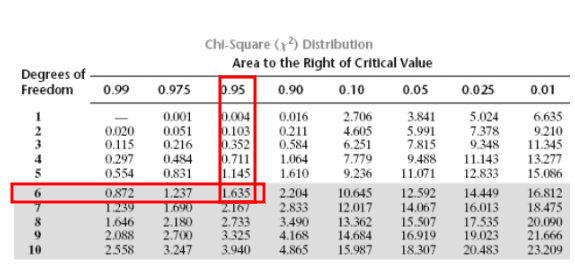
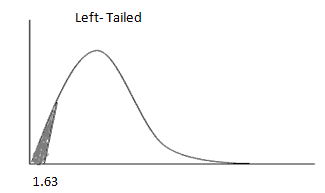
Let’s look at the Chi-Square table. This is the left tail test because S is less than σ, so df =7-1=6. The critical value for 95% confidence is 1.63.

The test statistic (1.5) is less than the critical value (1.63) and is in the rejection region. Hence, the null hypothesis must be rejected. The wait time decreased with the separate line.

Example 2: Testing a Claim About Product Reliability Variance

The Barnes Company makes a DVD player and claims that the mean number of hours of use before repairs is 400, with a standard deviation of 10 hours.

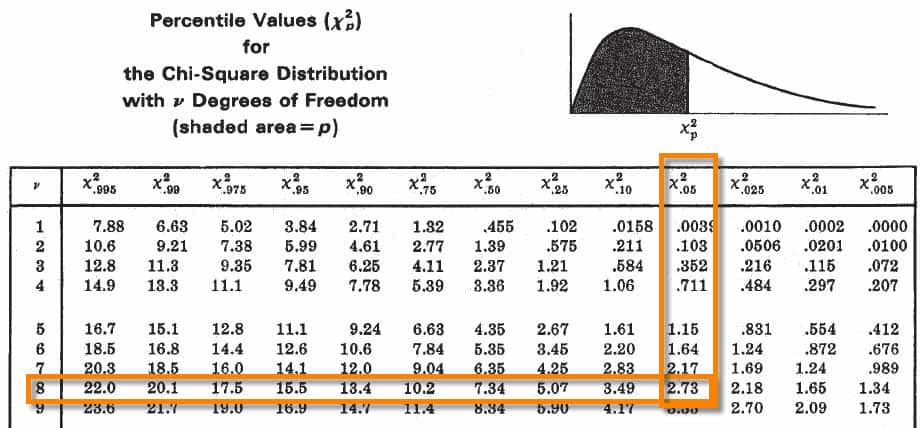
The specified variance, therefore, is σo2 = 102 = 100 hours2. A new company’s marketing representative suspects the “before repair” variance is less than 100 hours2. To verify this, she tests nine machines and finds a sample mean of 410 hours and a standard deviation of 5.5. Is the sample variance significantly less than the currently claimed variance? Use α = 0.05.

chi square ex1 chart
chi square ex1

Example 3: Investigating an Increase in Battery Life Variation

A smartwatch manufacturer receives complaints about the XYZ model’s battery life. The previous model had a known standard deviation of 7 hours (i.e., variance = 49). The company tests 11 new units and finds a sample standard deviation of 9 hours (variance = 81). They want to determine whether the new model has significantly more variability in battery life.

Hypotheses:

  • H₀: σ² ≤ 49
  • H₁: σ² > 49 (right-tailed test)

Step 1: Compute Test Statistic

[ chi^2 = frac{(n – 1) cdot s^2}{sigma_0^2} = frac{10 cdot 81}{49} approx 16.53 ]

Step 2: Determine Critical Value

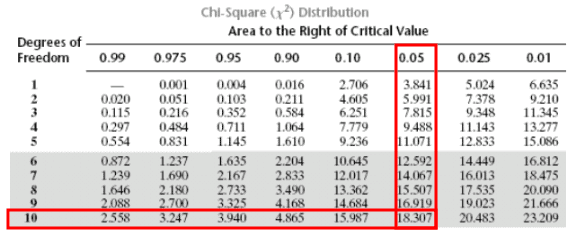
  • Degrees of freedom = 11 – 1 = 10
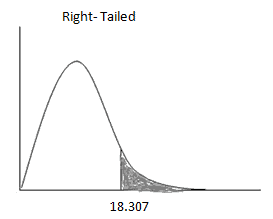
  • At α = 0.05 (right-tail), critical value = 18.307

Step 3: Decision

Since 16.53 < 18.307, we fail to reject the null hypothesis. There’s insufficient evidence to claim the new smartwatch has increased battery life variation.

📊 See visual reference:

  • Chi-square right-tail distribution
  • Test statistic formula

✅ Tip: This is a right-tailed test because the sample variance is higher than the known variance. That implies we’re looking for proof of increased variability.

Example 4: Comparing Wage Variability Across Teams (Two-Tailed Test)

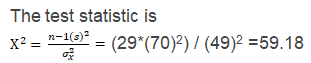
HR suspects that the new Digital Technology team’s wages have different variability than the established Java Technology team. Historically, the Java team has had a standard deviation of $49K, or a variance of 2,401. A sample of 30 Digital team employees shows a standard deviation of $70K, or a variance of 4,900.

We want to test whether this difference is statistically significant.

Hypotheses:

  • H₀: σ² = 2,401
  • H₁: σ² ≠ 2,401 (two-tailed test)

Step 1: Compute Test Statistic

[ chi^2 = frac{(n – 1) cdot s^2}{sigma_0^2} = frac{29 cdot 4,900}{2,401} approx 59.21 ]

Step 2: Determine Critical Values

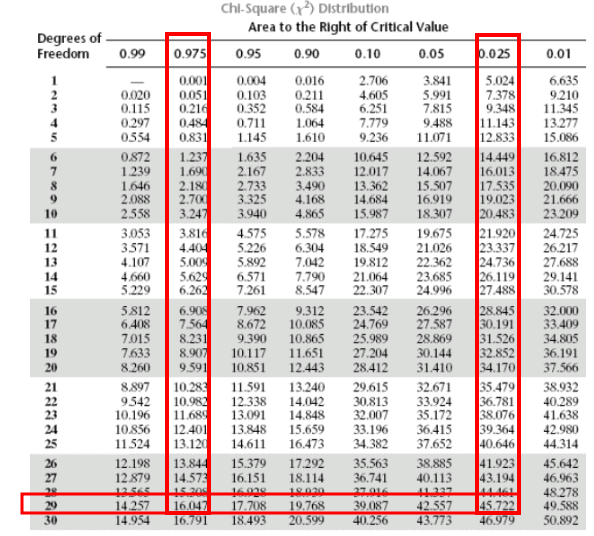
  • Degrees of freedom = 30 – 1 = 29
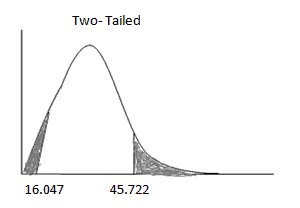
  • Left-tail (α/2 = 0.025): Critical value = 16.047
  • Right-tail (α/2 = 0.025): Critical value = 45.722

Step 3: Decision

Since 59.21 > 45.722, the test statistic lies in the right rejection region.
We reject the null hypothesis: there is significant evidence that the wage variation in the new team is different from the Java team.

📊 Visual references:

  • Chi-square split tails
  • Critical values comparison
  • Hypothesis test result

Reminder: In a two-tailed test, we split the alpha level (α) between both ends of the distribution. Use:

  • α/2 for each tail
  • (1 − α/2) for the cumulative probability when looking up left-tail critical values

Summary Table of Tail Types

Chi-Square Test for Variance: Summary Chart
Scenario Type Test Tail Hypotheses Form Rejection Region(s) Decision Rule
Suspect increased variation Right-tailed H₀: σ² ≤ σ₀²
H₁: σ² > σ₀²
χ² > critical value χ²stat > χ²critical
Suspect reduced variation Left-tailed H₀: σ² ≥ σ₀²
H₁: σ² < σ₀²
χ² < critical value χ²stat < χ²critical
Suspect any change Two-tailed H₀: σ² = σ₀²
H₁: σ² ≠ σ₀²
χ² < lower or > upper critical value χ²stat < lower OR > upper critical value

Special Cases and Considerations

  • Normality Assumption: The test relies on normal distribution. Use histograms or normality tests to validate.
  • Sample Size Sensitivity: Small samples may not adequately reflect the population. Consider larger n when feasible.
  • Tail Direction Confusion: Students often misinterpret whether a test should be right- or left-tailed. A simple rule:
    • If your sample variance is less than claimed → it’s a left-tailed test
    • If your sample variance is more than claimed → it’s a right-tailed test

Chi-Square Table Usage

  • Tables typically provide right-tail critical values.
  • For left-tail tests, use (1 – α) row.
  • For two-tailed tests, use α/2 in both tails.

Conclusion

The chi-square variance test provides a rigorous method for assessing process variation in a single population. It is a vital tool for Green and Black Belts during Measure and Improve phases of DMAIC. Proper application ensures improvements are statistically significant and aligned with Six Sigma principles of reducing variability and enhancing quality.

When you’re ready, there are a few ways I can help:

First, join 12,000+ other Six Sigma professionals by subscribing to my email newsletter. A short read every Monday to start your work week off correctly. Always free.

* * *

If you’re looking to pass your Six Sigma Green Belt or Black Belt exams, I’d recommend starting with my affordable study guide:

1)→ 🟢Pass Your Six Sigma Green Belt: a study guide organized by the exam Body of Knowledge, 1,000+ practice questions with detailed answer explanations, and 8 full-length mock exams

2)→ ⚫Pass Your Six Sigma Black Belt: the full Black Belt Body of Knowledge, 2,000+ practice questions with detailed answer explanations, and 8 full-length mock exams

You’ve spent so much effort learning Lean Six Sigma. Why leave passing your certification exam up to chance? This comprehensive study guide offers 1,000+ exam-like questions for Green Belts (2,000+ for Black Belts) with full answer walkthroughs, access to instructors, detailed study material, and more.

​ Thousands have used this system to prepare. Join them here.